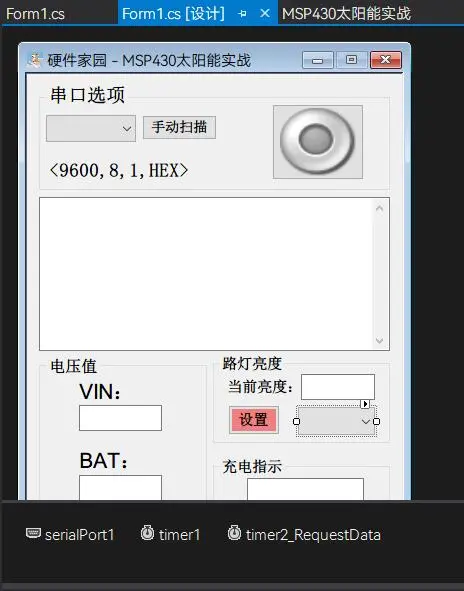
C#上位机学习
前言
我的仓库
工程管理器
- 修改生成的EXE图标
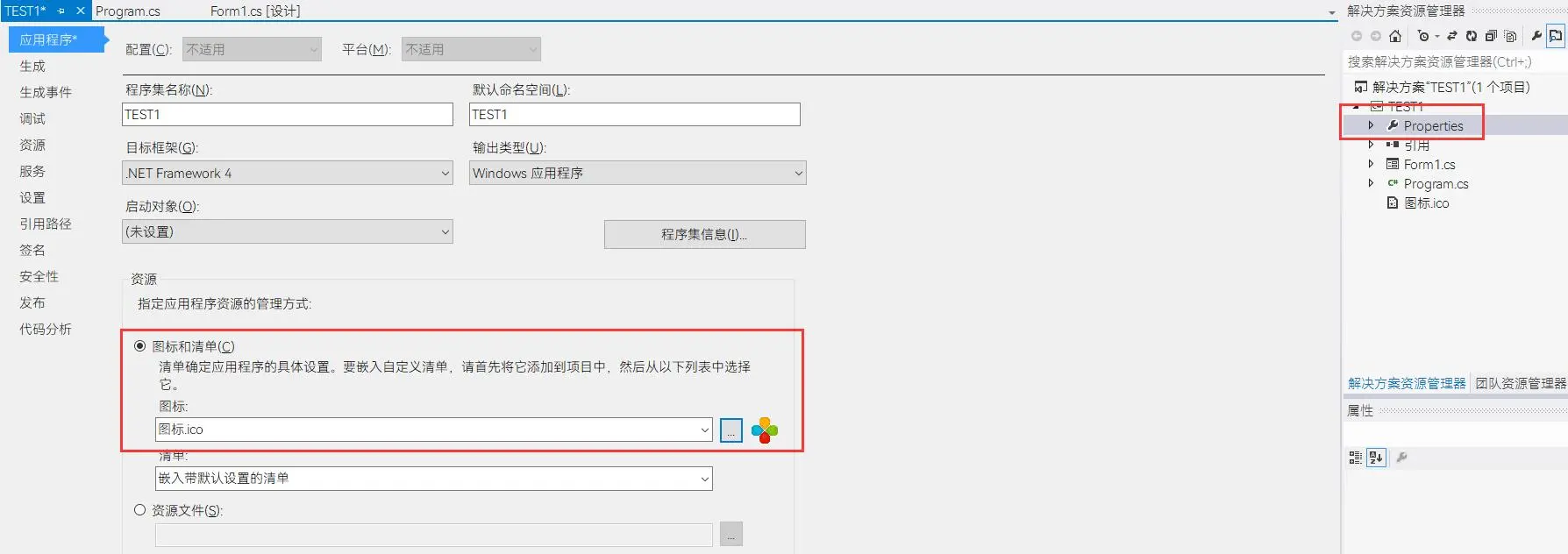
.webp)
- 【AssemblyInfo.cs】
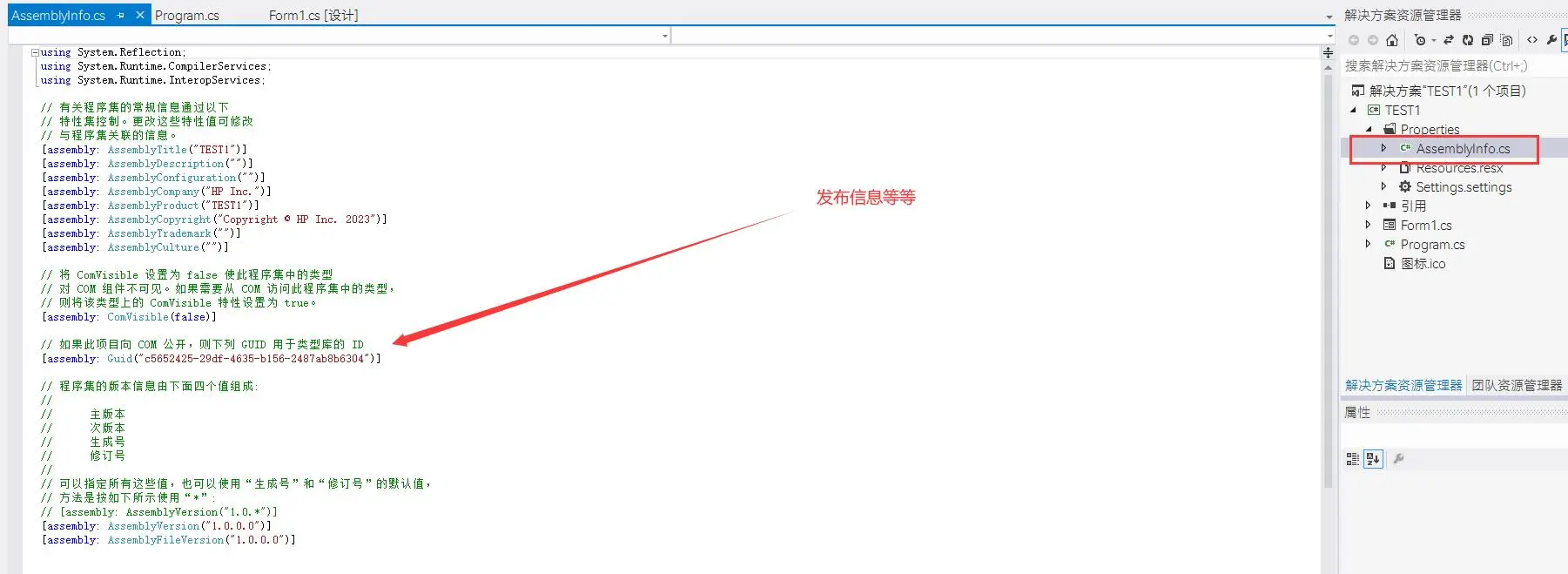
- 【Program.cs】
程序的入口,相当于C语言的Main函数
- 【Form1.cs】【常用】
窗体
里面的 Form1 是后台,写代码的地方【常用】
里面的 Form1.Designer.cs 是控件地方,添加一个控件里面自动会添加对应的代码
- 工具栏
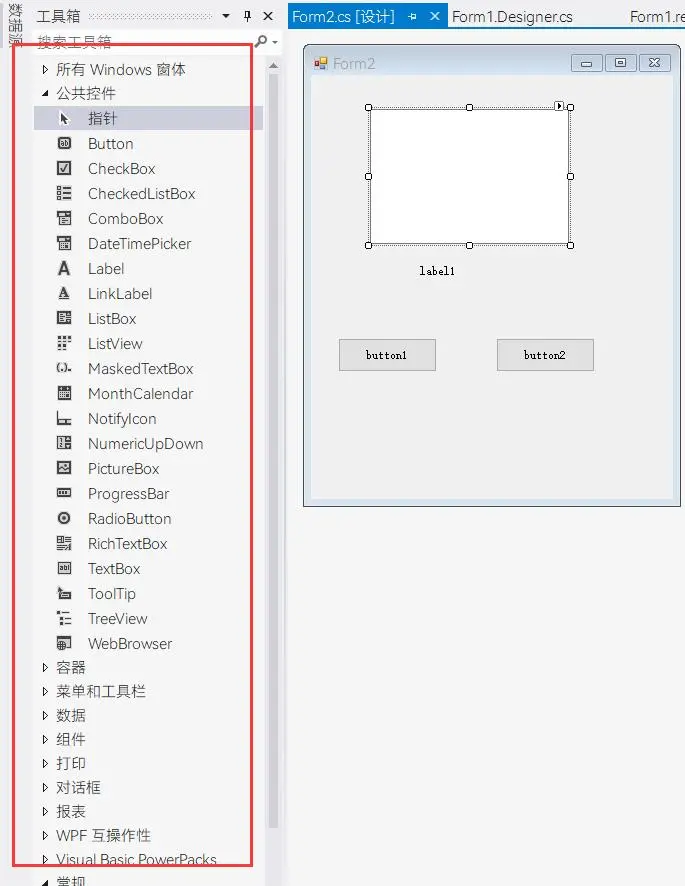
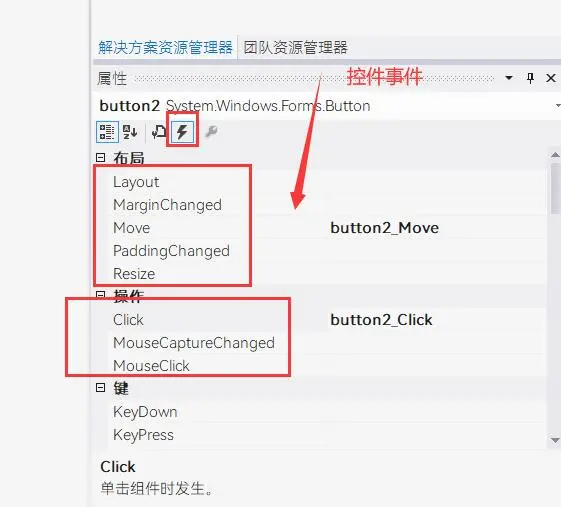
- 控件事件
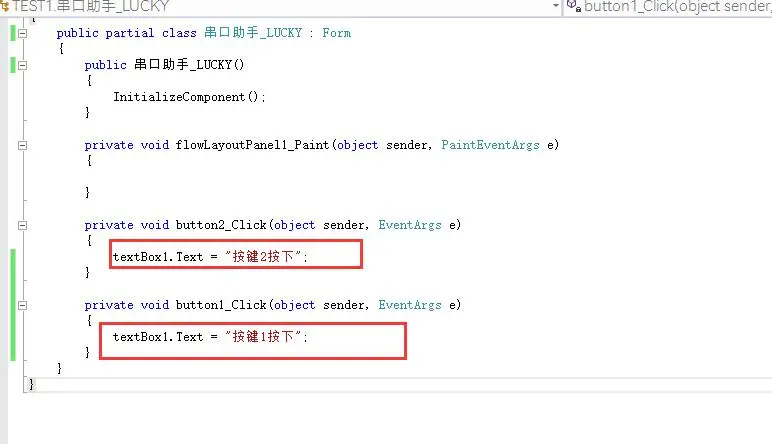
双击事件名称或者双击窗体控件就会生成并跳转到事件
第2讲
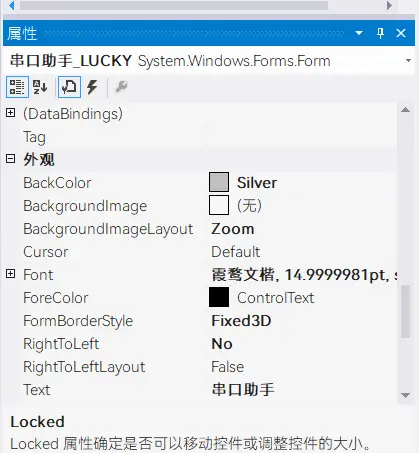
- 窗体控件属性
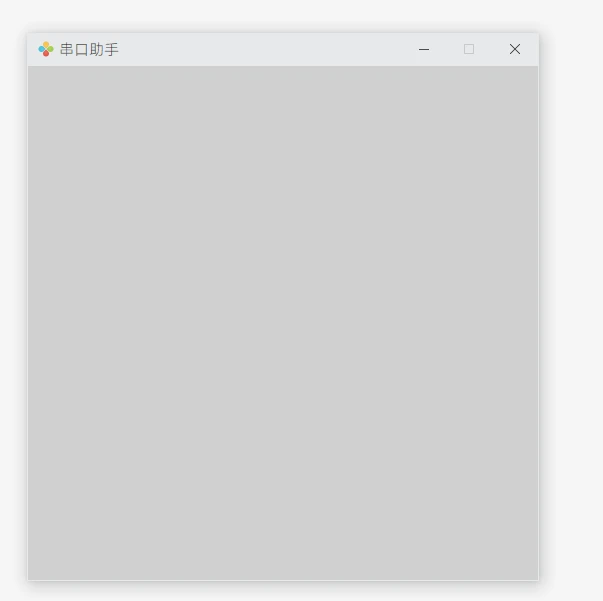
Button 按钮和TextBox 文本框
换行可以
\r\n
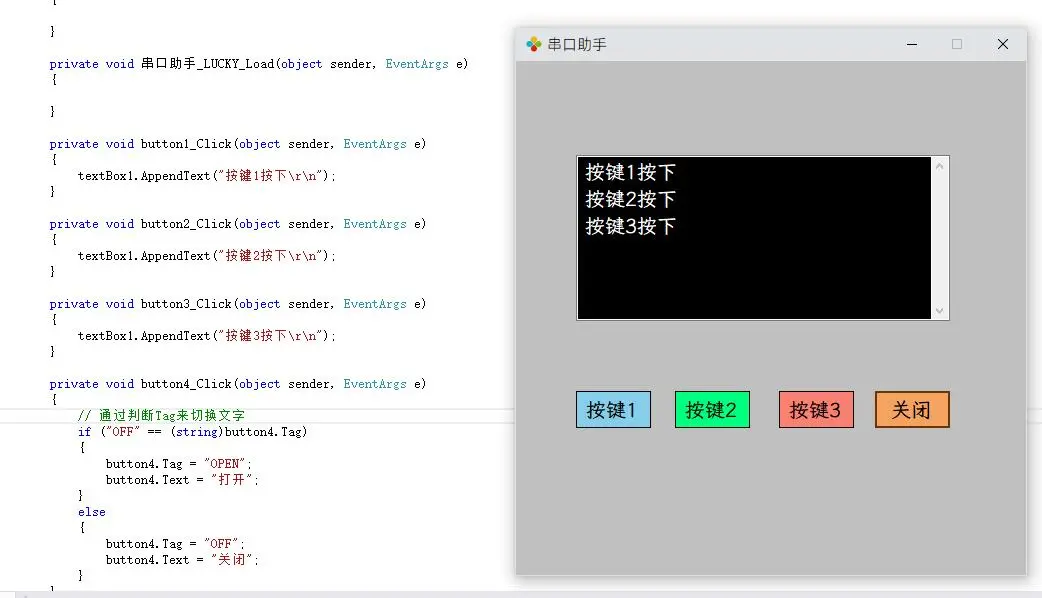
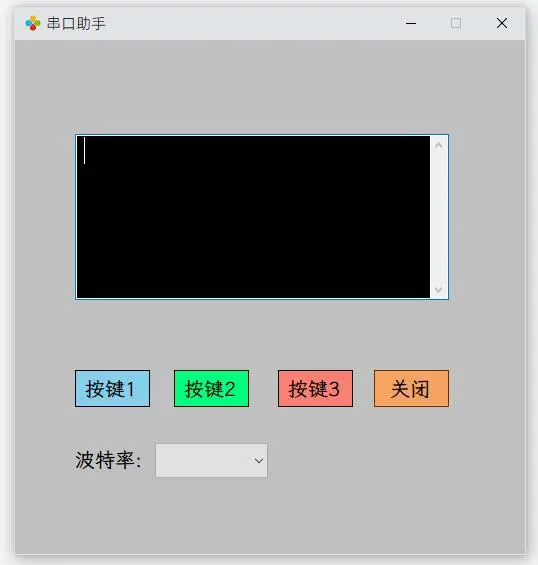
ComboBox 组合框和Lable 标签
组合框
DropDownStyle属性 可以设置为DropDownList,这样别人就不能修改内容了只能选
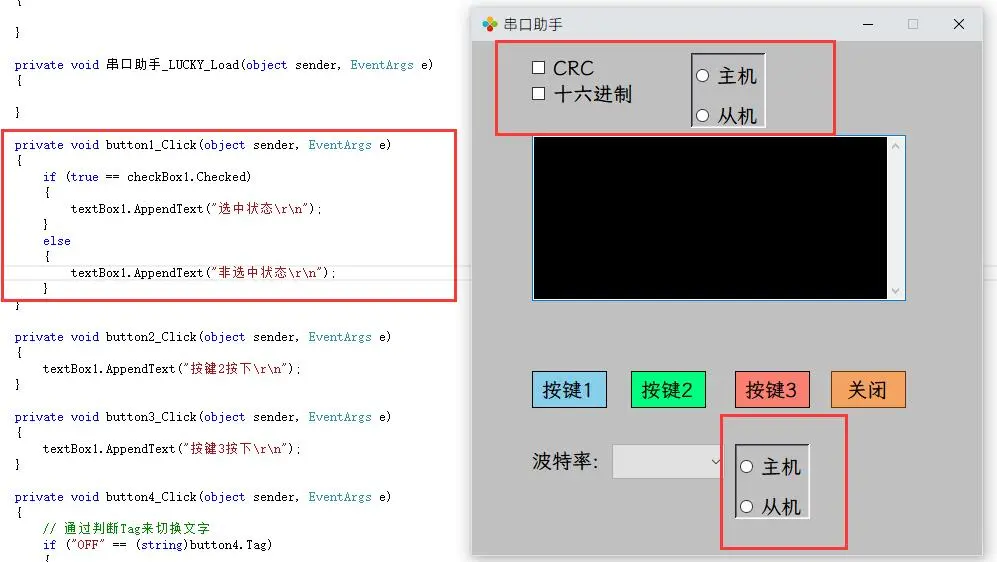
checkBox 多选框和RadioButton 单选框----- 容器:Panel 面板
Checked属性可以用来判断多选框是否被选中状态单选框的话只能有一个处于被选中状态,然后如果需要把单选框分开,互不影响则用到容器—面板
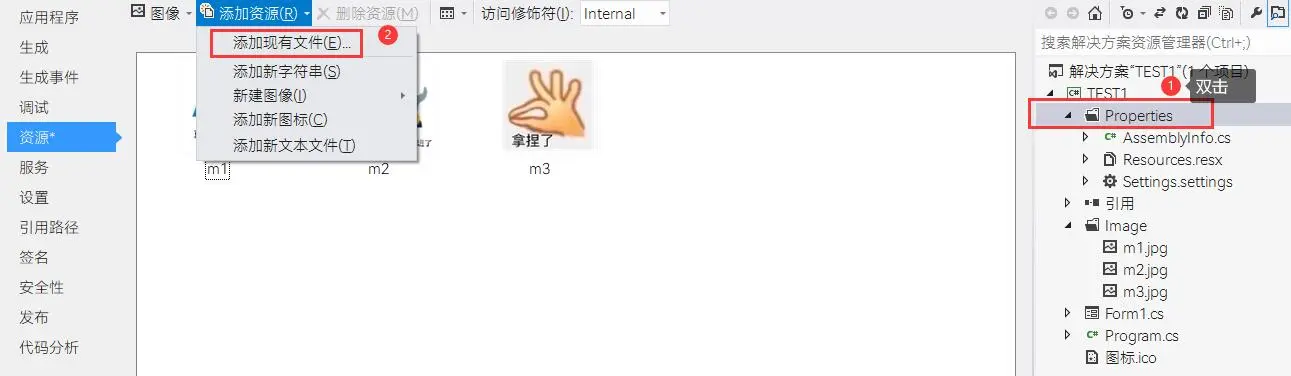
ProgressBar 进度条和PictrueBox 图片框
添加图片的话去资源那添加,需要把图片先复制到工程下文件夹里
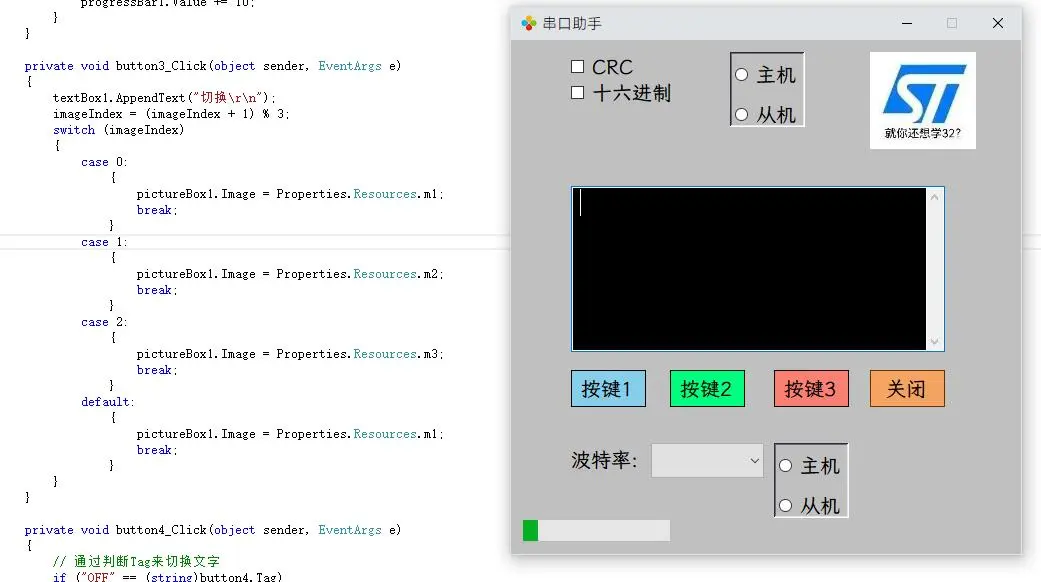
GroupBox 组合框,—组件:SerialPort 串口Timer 定时器

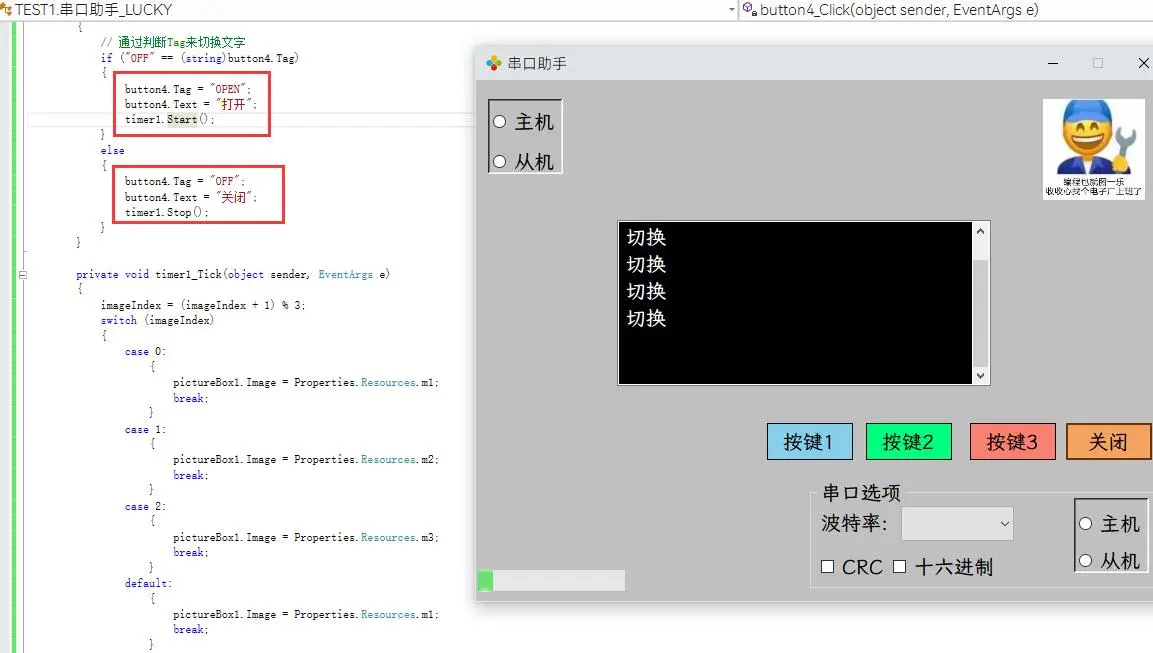
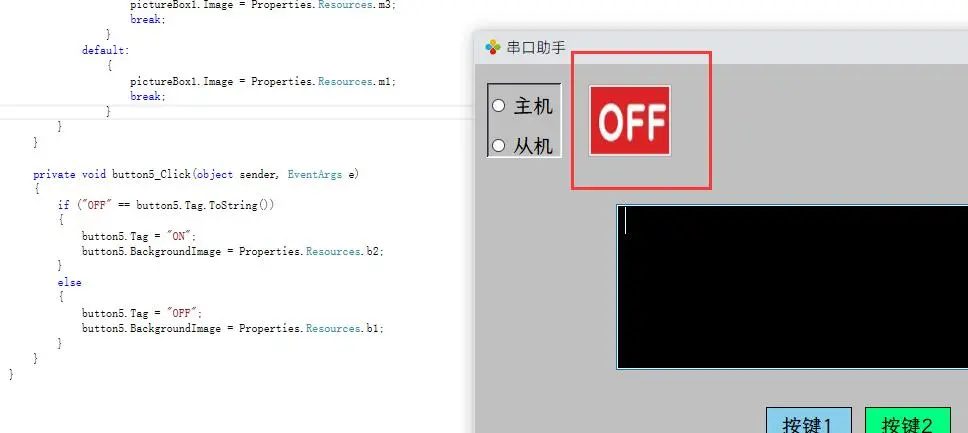
- 图形化按钮设计
按下变成另一张图片
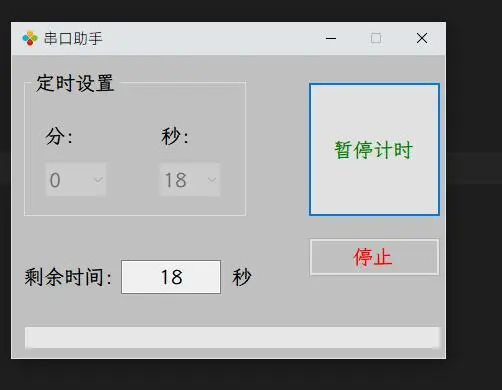
第3讲
- 定时器窗体界面设计
Form1.cs
using System;
using System.Collections.Generic;
using System.ComponentModel;
using System.Data;
using System.Drawing;
using System.Linq;
using System.Text;
using System.Windows.Forms;

namespace TEST1
{
    public partial class My_EXE : Form
    {
        // 总定时时间
        UInt16 TimerValue = 0;
        // 定时器计数
        UInt16 Timer1_Cnt = 0;
        // 定时状态---0:停止定时 1:开始定时 2:暂停定时
        byte Timing_State = 0;

        public My_EXE()
        {
            InitializeComponent();
        }

        private void flowLayoutPanel1_Paint(object sender, PaintEventArgs e)
        {

        }

        private void 串口助手_LUCKY_Load(object sender, EventArgs e)
        {
            byte i = 0;
            for (i = 0; i < 60; i++)
            {
                comboBox1.Items.Add(i.ToString());
                comboBox2.Items.Add(i.ToString());
            }
            comboBox1.Text = "0";
            comboBox2.Text = "0";
        }

        private void comboBox1_SelectedIndexChanged(object sender, EventArgs e)
        {

        }

        private void button1_Click(object sender, EventArgs e)
        {
            switch (Timing_State)
            {
                case 0:
                    {
                        // 获取总的时间
                        TimerValue = Convert.ToUInt16(comboBox1.Text);
                        TimerValue *= 60;
                        TimerValue += Convert.ToUInt16(comboBox2.Text);
                        if (TimerValue > 0)
                        {
                            textBox1.Text = TimerValue.ToString();
                            // 框字体颜色
                            button1.ForeColor = Color.Green;
                            button1.Text = "暂停计时";
                            // 使能BUTTON2
                            button2.Enabled = true;
                            // 失能定时时间设置
                            comboBox1.Enabled = false;
                            comboBox2.Enabled = false;
                            Timing_State = 1;
                            progressBar1.Value = 0;
                            progressBar1.Maximum = TimerValue;
                            timer1.Start();
                        }
                        else
                        {
                            // 提示音
                            System.Media.SystemSounds.Beep.Play();
                            // 提示框
                            MessageBox.Show("定时时间不能为0!", "警告");
                        }
                        break;
                    }
                case 1:
                    {
                        timer1.Stop();
                        // 框字体颜色
                        button1.ForeColor = Color.Green;
                        button1.Text = "计时继续";
                        Timing_State = 2;
                        break;
                    }
                case 2:
                    {
                        timer1.Start();
                        // 框字体颜色
                        button1.ForeColor = Color.Green;
                        button1.Text = "暂停计时";
                        Timing_State = 0;
                        break;
                    }
                default: break;
            }
        }

        private void timer1_Tick(object sender, EventArgs e)
        {
            Timer1_Cnt++;
            textBox1.Text = (TimerValue - Timer1_Cnt).ToString();
            progressBar1.Value = Timer1_Cnt;
            if (Timer1_Cnt == TimerValue)
            {
                timer1.Stop();
                Timer1_Cnt = 0;
                // 框字体颜色
                button1.ForeColor = Color.Black;
                button1.Text = "计时结束";
                // 提示音
                System.Media.SystemSounds.Beep.Play();
                // 提示框
                MessageBox.Show("时间到了", "提示");
                button1.Text = "开始定时";
                textBox1.Text = " ";
                comboBox1.Text = "0";
                comboBox2.Text = "0";
                comboBox1.Enabled = true;
                comboBox2.Enabled = true;
                button2.Enabled = false;
                progressBar1.Value = 0;
                Timing_State = 0;
            }
        }

        private void button2_Click(object sender, EventArgs e)
        {
            timer1.Stop();
            Timer1_Cnt = 0;
            button1.Text = "停止计时";
            // 提示音
            System.Media.SystemSounds.Beep.Play();
            // 框字体颜色
            button1.ForeColor = Color.Black;
            // 提示框
            MessageBox.Show("停止计时", "提示");
            button1.Text = "开始定时";
            textBox1.Text = " ";
            comboBox1.Text = "0";
            comboBox2.Text = "0";
            comboBox1.Enabled = true;
            comboBox2.Enabled = true;
            button2.Enabled = false;
            progressBar1.Value = 0;
            Timing_State = 0;
        }
    }
}
第4讲
- 扫描串口端口号,初始上位机模板设计
Form1.cs
using System;
using System.Collections.Generic;
using System.ComponentModel;
using System.Data;
using System.Drawing;
using System.Linq;
using System.Text;
using System.Windows.Forms;

// 添加指令集
using System.IO.Ports;


namespace TEST1
{
    public partial class My_EXE : Form
    {
        public My_EXE()
        {
            InitializeComponent();
        }
        private void flowLayoutPanel1_Paint(object sender, PaintEventArgs e)
        {

        }
        //打开软件加载
        private void My_EXE_Load(object sender, EventArgs e)
        {
            SearchAndAddSerialToComboBox(serialPort1, comboBox1);
        }
        // 手动扫描并添加可用串口
        private void SearchAndAddSerialToComboBox(SerialPort MyPort, ComboBox MyBox)
        {
            //清空下拉框
            MyBox.Items.Clear();
            MyBox.Text = "";
            // 获取本机串口列表
            string[] ComputerPortName = SerialPort.GetPortNames();

            for (byte i = 0; i < ComputerPortName.Length; i++)
            {
                try
                {
                    MyPort.PortName = ComputerPortName[i];
                    MyPort.Open();
                    MyBox.Items.Add(MyPort.PortName);
                    MyPort.Close();

                    if (MyBox.Text == "")
                    {
                        MyBox.Text = MyPort.PortName;
                    }
                }
                catch
                {

                }
            }
            if (MyBox.Text == "")
            {
                textBox1.AppendText("[" + DateTime.Now.ToString("HH:mm:ss") + "]" + "->");
                textBox1.AppendText("没有检测到串口工具!\r\n");
            }
        }
         //【手动扫描】
        private void button1_Click(object sender, EventArgs e)
        {
                // 先判断串口是否打开,打开了则要关闭再扫描
            if (serialPort1.IsOpen == true)
            {
                serialPort1.Close();
                button2.BackgroundImage = Properties.Resources.b1;
                button2.Tag = "OFF";
                textBox1.AppendText("[" + DateTime.Now.ToString("HH:mm:ss") + "]" + "->");
                textBox1.AppendText("扫描并添加串口时关闭串口!\r\n");
            }
            SearchAndAddSerialToComboBox(serialPort1, comboBox1);
        }

        private void button2_Click(object sender, EventArgs e)
        {
            if (button2.Tag.ToString() == "OFF")
            {
                // 打开串口
                try
                {
                    serialPort1.PortName = comboBox1.Text;
                    serialPort1.Open();
                    button2.BackgroundImage = Properties.Resources.b2;
                    button2.Tag = "ON";
                    textBox1.AppendText("[" + DateTime.Now.ToString("HH:mm:ss") + "]" + "->");
                    textBox1.AppendText("手动打开串口!\r\n");
                }
                catch
                {
                    serialPort1.Close();
                    button2.BackgroundImage = Properties.Resources.b1;
                    button2.Tag = "OFF";
                    textBox1.AppendText("[" + DateTime.Now.ToString("HH:mm:ss") + "]" + "->");
                    textBox1.AppendText("串口打开失败!\r\n");
                }
            }
            else
            {
                // 关闭串口
                serialPort1.Close();
                button2.BackgroundImage = Properties.Resources.b1;
                button2.Tag = "OFF";
                textBox1.AppendText("[" + DateTime.Now.ToString("HH:mm:ss") + "]" + "->");
                textBox1.AppendText("手动关闭串口!\r\n");
            }
        }
        //【下拉框发生变化】
        private void comboBox1_SelectedIndexChanged(object sender, EventArgs e)
        {
            if (serialPort1.IsOpen == true)
            {
                serialPort1.Close();
                try
                {
                    serialPort1.PortName = comboBox1.Text;
                    serialPort1.Open();
                    button2.BackgroundImage = Properties.Resources.b2;
                    button2.Tag = "ON";
                    textBox1.AppendText("[" + DateTime.Now.ToString("HH:mm:ss") + "]" + "->");
                    textBox1.AppendText("串口更换成功!\r\n");
                }
                catch
                {
                    serialPort1.Close();
                    button2.BackgroundImage = Properties.Resources.b1;
                    button2.Tag = "OFF";
                    textBox1.AppendText("[" + DateTime.Now.ToString("HH:mm:ss") + "]" + "->");
                    textBox1.AppendText("串口更换失败!\r\n");
                }
            }
        }
        //【定时器扫描】
        private void timer1_Tick(object sender, EventArgs e)
        {
                if (!serialPort1.IsOpen)
                {
                    serialPort1.Close();
                    button2.BackgroundImage = Properties.Resources.b1;
                    button2.Tag = "OFF";
                    // 重新扫描并添加串口
                    SearchAndAddSerialToComboBox(serialPort1, comboBox1);
                }
        }
    }
}
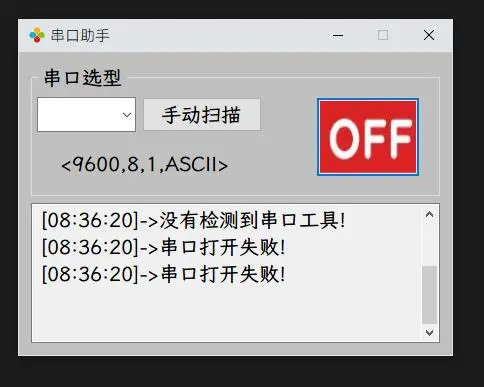
第5讲
- 串口接收和发送数据
使用虚拟串口
VSPD模拟发送接收
Form1.cs
using System;
using System.Collections.Generic;
using System.ComponentModel;
using System.Data;
using System.Drawing;
using System.Linq;
using System.Text;
using System.Windows.Forms;

// 添加指令集
using System.IO.Ports;


namespace TEST1
{
    public partial class My_EXE : Form
    {
        public My_EXE()
        {
            InitializeComponent();
            // 禁止这种异常的抛出(不加的话运行会报错),避免出现跨线程访问控件
            System.Windows.Forms.Control.CheckForIllegalCrossThreadCalls = false;
        }
        private void flowLayoutPanel1_Paint(object sender, PaintEventArgs e)
        {

        }
        //打开软件加载
        private void My_EXE_Load(object sender, EventArgs e)
        {
            SearchAndAddSerialToComboBox(serialPort1, comboBox1);
        }
        // 手动扫描并添加可用串口
        private void SearchAndAddSerialToComboBox(SerialPort MyPort, ComboBox MyBox)
        {
            //清空下拉框
            MyBox.Items.Clear();
            MyBox.Text = "";
            // 获取本机串口列表
            string[] ComputerPortName = SerialPort.GetPortNames();

            for (byte i = 0; i < ComputerPortName.Length; i++)
            {
                try
                {
                    MyPort.PortName = ComputerPortName[i];
                    MyPort.Open();
                    MyBox.Items.Add(MyPort.PortName);
                    MyPort.Close();

                    if (MyBox.Text == "")
                    {
                        MyBox.Text = MyPort.PortName;
                    }
                }
                catch
                {

                }
            }
            if (MyBox.Text == "")
            {
                textBox1.AppendText("[" + DateTime.Now.ToString("HH:mm:ss") + "]" + "->");
                textBox1.AppendText("没有检测到串口工具!\r\n");
            }
        }
        //【手动扫描】
        private void button1_Click(object sender, EventArgs e)
        {
            // 先判断串口是否打开,打开了则要关闭再扫描
            if (serialPort1.IsOpen == true)
            {
                serialPort1.Close();
                button2.BackgroundImage = Properties.Resources.b1;
                button2.Tag = "OFF";
                textBox1.AppendText("[" + DateTime.Now.ToString("HH:mm:ss") + "]" + "->");
                textBox1.AppendText("扫描并添加串口时关闭串口!\r\n");
            }
            SearchAndAddSerialToComboBox(serialPort1, comboBox1);
        }

        private void button2_Click(object sender, EventArgs e)
        {
            if (button2.Tag.ToString() == "OFF")
            {
                // 打开串口
                try
                {
                    serialPort1.PortName = comboBox1.Text;
                    // 把字符串波特率转换为32位波特率
                    serialPort1.BaudRate = Convert.ToInt32(comboBox2.Text);
                    serialPort1.Open();
                    button2.BackgroundImage = Properties.Resources.b2;
                    button2.Tag = "ON";
                    textBox1.AppendText("[" + DateTime.Now.ToString("HH:mm:ss") + "]" + "->");
                    textBox1.AppendText("手动打开串口!\r\n");
                }
                catch
                {
                    serialPort1.Close();
                    button2.BackgroundImage = Properties.Resources.b1;
                    button2.Tag = "OFF";
                    textBox1.AppendText("[" + DateTime.Now.ToString("HH:mm:ss") + "]" + "->");
                    textBox1.AppendText("串口打开失败!\r\n");
                }
            }
            else
            {
                // 关闭串口
                serialPort1.Close();
                button2.BackgroundImage = Properties.Resources.b1;
                button2.Tag = "OFF";
                textBox1.AppendText("[" + DateTime.Now.ToString("HH:mm:ss") + "]" + "->");
                textBox1.AppendText("手动关闭串口!\r\n");
            }
        }
        //【下拉框发生变化】
        private void comboBox1_SelectedIndexChanged(object sender, EventArgs e)
        {
            if (serialPort1.IsOpen == true)
            {
                serialPort1.Close();
                try
                {
                    serialPort1.PortName = comboBox1.Text;
                    serialPort1.Open();
                    button2.BackgroundImage = Properties.Resources.b2;
                    button2.Tag = "ON";
                    textBox1.AppendText("[" + DateTime.Now.ToString("HH:mm:ss") + "]" + "->");
                    textBox1.AppendText("串口更换成功!\r\n");
                }
                catch
                {
                    serialPort1.Close();
                    button2.BackgroundImage = Properties.Resources.b1;
                    button2.Tag = "OFF";
                    textBox1.AppendText("[" + DateTime.Now.ToString("HH:mm:ss") + "]" + "->");
                    textBox1.AppendText("串口更换失败!\r\n");
                }
            }
        }
        //【定时器扫描】
        private void timer1_Tick(object sender, EventArgs e)
        {
            if (!serialPort1.IsOpen)
            {
                serialPort1.Close();
                button2.BackgroundImage = Properties.Resources.b1;
                button2.Tag = "OFF";
                // 重新扫描并添加串口
                SearchAndAddSerialToComboBox(serialPort1, comboBox1);
            }
        }
        // 串口接收
        private void serialPort1_DataReceived(object sender, SerialDataReceivedEventArgs e)
        {
            // 接格式为ASCII
            if (!checkBox1.Checked)
            {
                try
                {
                    textBox1.AppendText("[" + DateTime.Now.ToString("HH:mm:ss") + "]" + "->");
                    string str = serialPort1.ReadExisting();    // 以字符串格式读
                    textBox1.AppendText(str);
                }
                catch
                {
                    textBox1.AppendText("[" + DateTime.Now.ToString("HH:mm:ss") + "]" + "->");
                    textBox1.AppendText("ASCII格式接收错误!\r\n");
                }
            }
            // 接收格式为HEX
            else
            {
                try
                {
                    textBox1.AppendText("[" + DateTime.Now.ToString("HH:mm:ss") + "]" + "->");
                    byte[] data = new byte[serialPort1.BytesToRead];   // 定义缓冲区
                    serialPort1.Read(data, 0, data.Length);
                    // 遍历
                    foreach (byte Number in data)
                    {
                        string str = Convert.ToString(Number, 16).ToUpper();
                        textBox1.AppendText((str.Length == 1 ? "0" + str : str) + " ");
                    }
                    textBox1.AppendText("\r\n");
                }
                catch
                {
                    textBox1.AppendText("[" + DateTime.Now.ToString("HH:mm:ss") + "]" + "->");
                    textBox1.AppendText("HEX格式接收错误!\r\n");
                }
            }
        }
        // 【清屏】
        private void button3_Click(object sender, EventArgs e)
        {
            textBox1.Text = "";
        }
        // 【发送】
        private void button4_Click(object sender, EventArgs e)
        {
            byte[] data = new byte[1];

            // 发送格式为ASCII
            if (!checkBox3.Checked)
            {
                try
                {
                    foreach (byte Number in textBox3.Text)
                    {
                        data[0] = Number;
                        serialPort1.Write(data, 0, 1);
                    }
                }
                catch
                {
                    textBox1.AppendText("\r\n串口数据发送失败!!!\r\n");
                    textBox3.Text = "";
                    serialPort1.Close();
                    button2.BackgroundImage = Properties.Resources.b1;
                    button2.Tag = "OFF";
                }
            }
            // 发送格式为HEX
            else
            {
                // 处理字符串
                string Buf = textBox3.Text;
                // 去掉0x 0X
                Buf = Buf.Replace("0x", string.Empty);
                Buf = Buf.Replace("0X", string.Empty);
                Buf = Buf.Replace(" ", string.Empty);

                textBox3.Text = "";
                //循环发送,保证都是2位,1位就丢弃
                for (int i = 0; i < (Buf.Length - Buf.Length % 2) / 2; i++)
                {
                    textBox3.AppendText(Buf.Substring(i * 2, 2) + " ");
                    try
                    {
                        // 转换为16进制发送
                        data[0] = Convert.ToByte(Buf.Substring(i * 2, 2), 16);
                        serialPort1.Write(data, 0, 1);
                    }
                    catch
                    {
                        textBox1.AppendText("\r\n串口数据发送失败!!!\r\n");
                        textBox3.Text = "";
                        serialPort1.Close();
                        button2.BackgroundImage = Properties.Resources.b1;
                        button2.Tag = "OFF";
                    }
                }
            }
        }
        // 清除发送
        private void button5_Click(object sender, EventArgs e)
        {
            textBox3.Text = "";
        }
    }
}
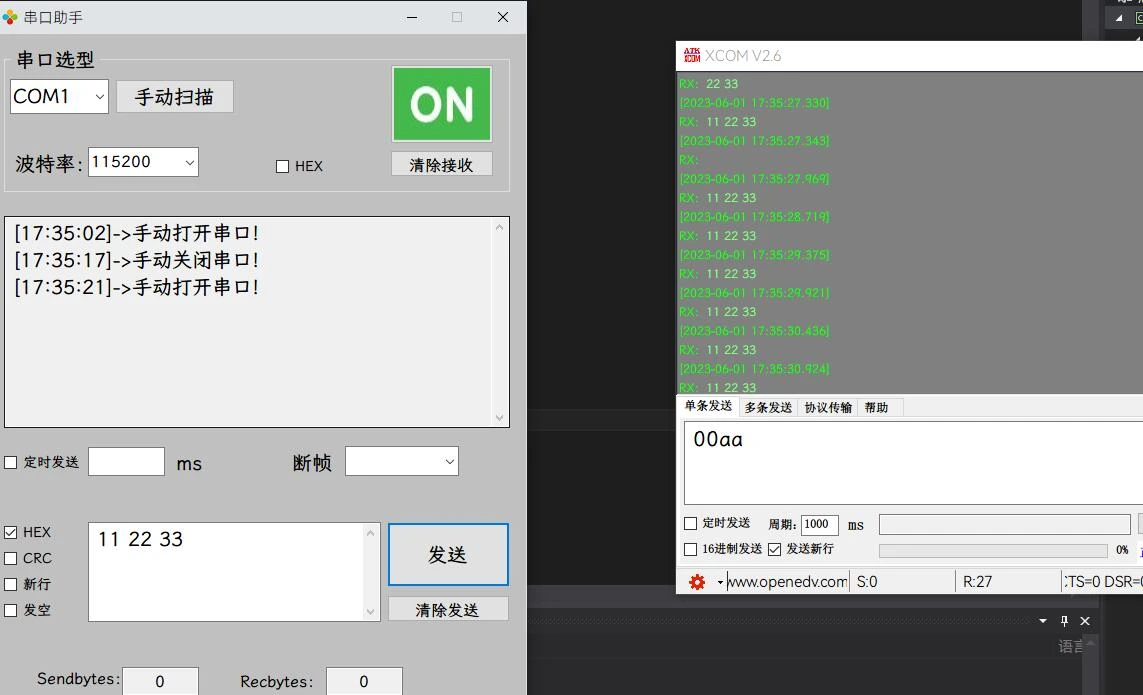
第6讲
- 软件设置保存与汉字显示方法
ini文件读取和写入:
[DllImport("kernel32")]
private static extern long WritePrivateProfileString(string section, string  key, string val, string filePath); // 系统DLL导入ini写函数
[DllImport("kernel32")]
private static extern int GetPrivateProfileString(string section, string  key, string def, StringBuilder retVal, int size,  string filePath); // 系统DLL导入ini读函数
string FileName = System.AppDomain.CurrentDomain.BaseDirectory + "Backup.ini";  // ini文件名
StringBuilder BackupBuf = new StringBuilder(50);    // 存储读出的ini内容变量
WritePrivateProfileString函数用于在 INI 文件中写入配置项。它接受四个参数:
section:表示配置项所属的节(Section)名称;key:表示配置项的名称;val:表示配置项的值;filePath:表示 INI 文件的完整路径和文件名。
GetPrivateProfileString函数用于从 INI 文件中读取配置项的值。它接受六个参数:
section:表示配置项所属的节名称;key:表示配置项的名称;def:表示如果没有找到指定的配置项,则返回的默认值;retVal:表示存储读取到的配置项值的 StringBuilder 对象;size:表示输入的 StringBuilder 对象可容纳的最大字符数;filePath:表示 INI 文件的完整路径和文件名。
FileName:表示 INI 文件的完整路径和文件名,它使用System.AppDomain.CurrentDomain.BaseDirectory获取应用程序根目录的路径,然后加上文件名"Backup.ini"组成完整路径。
BackupBuf:表示存储读取到的 INI 配置项值的 StringBuilder 对象,它的容量为 50 个字符,用于存储较短的字符串类型的配置项值。
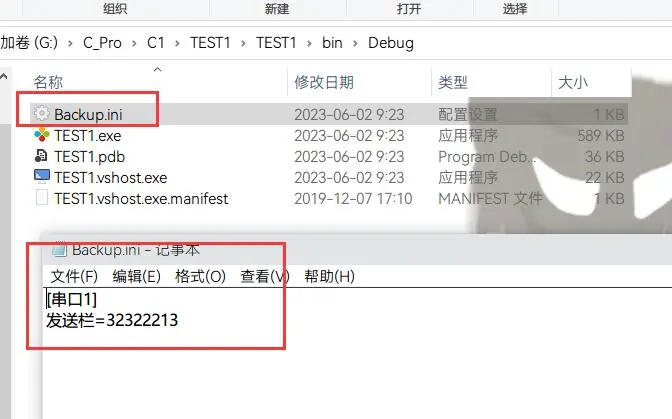
Form1.cs
using System;
using System.Collections.Generic;
using System.ComponentModel;
using System.Data;
using System.Drawing;
using System.Linq;
using System.Text;
using System.Windows.Forms;
// 添加指令集
using System.IO.Ports;
using System.Runtime.InteropServices;
namespace TEST1
{
public partial class My_EXE : Form
{
[DllImport("kernel32")]
private static extern long WritePrivateProfileString(string section, string key, string val, string filePath); // 系统DLL导入ini写函数
[DllImport("kernel32")]
private static extern int GetPrivateProfileString(string section, string key, string def, StringBuilder retVal,int size, string filePath); // 系统DLL导入ini读函数
string FileName = System.AppDomain.CurrentDomain.BaseDirectory + "Backup.ini"; // ini文件名
StringBuilder BackupBuf = new StringBuilder(50); // 存储读出的ini内容变量
public My_EXE()
{
InitializeComponent();
// 禁止这种异常的抛出(不加的话运行会报错),避免出现跨线程访问控件
System.Windows.Forms.Control.CheckForIllegalCrossThreadCalls = false;
// 支持中文
serialPort1.Encoding = Encoding.GetEncoding("GB2312");
}
private void flowLayoutPanel1_Paint(object sender, PaintEventArgs e)
{
}
//打开软件加载
private void My_EXE_Load(object sender, EventArgs e)
{
SearchAndAddSerialToComboBox(serialPort1, comboBox1);
// 恢复发送栏
GetPrivateProfileString("串口1", "发送栏", "", BackupBuf, 50, FileName);
textBox3.Text = BackupBuf.ToString();
}
// 手动扫描并添加可用串口
private void SearchAndAddSerialToComboBox(SerialPort MyPort, ComboBox MyBox)
{
MyBox.Text = " ";
// 获取本机串口列表
string[] ComputerPortName = SerialPort.GetPortNames();
string BackupPort;
// 恢复端口号
GetPrivateProfileString("串口1", "端口号", "", BackupBuf, 50, FileName);
BackupPort = BackupBuf.ToString();
//清空下拉框
MyBox.Items.Clear();
for (byte i = 0; i < ComputerPortName.Length; i++)
{
try
{
MyPort.PortName = ComputerPortName[i];
MyPort.Open();
MyBox.Items.Add(MyPort.PortName);
MyPort.Close();
// 检查端口号是否有效,端口号初始化为备份端口号
if (BackupPort == MyPort.PortName)
{
comboBox1.Text = BackupPort;
}
// 备份端口无效则默认第一个
if (MyBox.Text == "")
{
MyBox.Text = MyPort.PortName;
}
}
catch
{
}
}
if (MyBox.Text == "")
{
textBox1.AppendText("[" + DateTime.Now.ToString("HH:mm:ss") + "]" + "->");
textBox1.AppendText("没有检测到串口工具!\r\n");
}
// 备份端口号
WritePrivateProfileString("串口1", "端口号", MyBox.Text, FileName);
}
//【手动扫描】
private void button1_Click(object sender, EventArgs e)
{
// 先判断串口是否打开,打开了则要关闭再扫描
if (serialPort1.IsOpen == true)
{
serialPort1.Close();
button2.BackgroundImage = Properties.Resources.b1;
button2.Tag = "OFF";
textBox1.AppendText("[" + DateTime.Now.ToString("HH:mm:ss") + "]" + "->");
textBox1.AppendText("扫描并添加串口时关闭串口!\r\n");
}
SearchAndAddSerialToComboBox(serialPort1, comboBox1);
}
private void button2_Click(object sender, EventArgs e)
{
if (button2.Tag.ToString() == "OFF")
{
// 打开串口
try
{
serialPort1.PortName = comboBox1.Text;
// 把字符串波特率转换为32位波特率
serialPort1.BaudRate = Convert.ToInt32(comboBox2.Text);
serialPort1.Open();
button2.BackgroundImage = Properties.Resources.b2;
button2.Tag = "ON";
textBox1.AppendText("[" + DateTime.Now.ToString("HH:mm:ss") + "]" + "->");
textBox1.AppendText("手动打开串口!\r\n");
// 开启定时器
timer1.Start();
}
catch
{
serialPort1.Close();
button2.BackgroundImage = Properties.Resources.b1;
button2.Tag = "OFF";
textBox1.AppendText("[" + DateTime.Now.ToString("HH:mm:ss") + "]" + "->");
textBox1.AppendText("串口打开失败!\r\n");
timer1.Stop();
}
}
else
{
// 关闭串口
serialPort1.Close();
button2.BackgroundImage = Properties.Resources.b1;
button2.Tag = "OFF";
textBox1.AppendText("[" + DateTime.Now.ToString("HH:mm:ss") + "]" + "->");
textBox1.AppendText("手动关闭串口!\r\n");
timer1.Stop();
}
}
//【下拉框发生变化】
private void comboBox1_SelectedIndexChanged(object sender, EventArgs e)
{
if (serialPort1.IsOpen == true)
{
serialPort1.Close();
try
{
serialPort1.PortName = comboBox1.Text;
serialPort1.Open();
button2.BackgroundImage = Properties.Resources.b2;
button2.Tag = "ON";
textBox1.AppendText("[" + DateTime.Now.ToString("HH:mm:ss") + "]" + "->");
textBox1.AppendText("串口更换成功!\r\n");
}
catch
{
serialPort1.Close();
button2.BackgroundImage = Properties.Resources.b1;
button2.Tag = "OFF";
textBox1.AppendText("[" + DateTime.Now.ToString("HH:mm:ss") + "]" + "->");
textBox1.AppendText("串口更换失败!\r\n");
}
}
// 备份端口号
WritePrivateProfileString("串口1", "端口号", comboBox1.Text, FileName);
}
//【定时器扫描】
private void timer1_Tick(object sender, EventArgs e)
{
if (!serialPort1.IsOpen)
{
serialPort1.Close();
button2.BackgroundImage = Properties.Resources.b1;
button2.Tag = "OFF";
// 重新扫描并添加串口
SearchAndAddSerialToComboBox(serialPort1, comboBox1);
}
}
// 串口接收
private void serialPort1_DataReceived(object sender, SerialDataReceivedEventArgs e)
{
// 接格式为ASCII
if (!checkBox1.Checked)
{
try
{
textBox1.AppendText("[" + DateTime.Now.ToString("HH:mm:ss") + "]" + "->");
string str = serialPort1.ReadExisting(); // 以字符串格式读
textBox1.AppendText(str);
}
catch
{
textBox1.AppendText("[" + DateTime.Now.ToString("HH:mm:ss") + "]" + "->");
textBox1.AppendText("ASCII格式接收错误!\r\n");
}
}
// 接收格式为HEX
else
{
try
{
textBox1.AppendText("[" + DateTime.Now.ToString("HH:mm:ss") + "]" + "->");
byte[] data = new byte[serialPort1.BytesToRead]; // 定义缓冲区
serialPort1.Read(data, 0, data.Length);
// 遍历
foreach (byte Number in data)
{
string str = Convert.ToString(Number, 16).ToUpper();
textBox1.AppendText((str.Length == 1 ? "0" + str : str) + " ");
}
textBox1.AppendText("\r\n");
}
catch
{
textBox1.AppendText("[" + DateTime.Now.ToString("HH:mm:ss") + "]" + "->");
textBox1.AppendText("HEX格式接收错误!\r\n");
}
}
}
// 【清屏】
private void button3_Click(object sender, EventArgs e)
{
textBox1.Text = "";
}
// CRC计算
private UInt16 Crc_Check(byte[] Data, byte DataLEN)
{
UInt16 CRC = 0xFFFF;
for(byte i = 0; i < DataLEN; i++)
{
CRC = Data[i];
for(byte j = 0;j < 8; j++)
{
if((CRC & 0x0001) == 0x0001)
{
CRC = (UInt16)((CRC >> 1) ^ 0xA001);
}
else
{
CRC = (UInt16)(CRC >> 1);
}
}
}
CRC = (UInt16)((CRC >> 8) + (CRC << 8));
return CRC;
}
// 【发送】
private void button4_Click(object sender, EventArgs e)
{
byte[] data = new byte[1];
// 发送格式为ASCII
if (!checkBox3.Checked)
{
try
{
// 支持中文
Encoding Chinese = System.Text.Encoding.GetEncoding("GB2312");
byte[] SendByte = Chinese.GetBytes(textBox3.Text);
foreach (byte Number in SendByte)
{
data[0] = Number;
serialPort1.Write(data, 0, 1);
}
//发送新行
if (checkBox5.Checked)
{
data[0] = 0x0D;
serialPort1.Write(data, 0, 1); // 发送回车
data[0] = 0x0A;
serialPort1.Write(data, 0, 1); // 发送换行
}
}
catch
{
textBox1.AppendText("\r\n串口数据发送失败!!!\r\n");
serialPort1.Close();
button2.BackgroundImage = Properties.Resources.b1;
button2.Tag = "OFF";
}
}
// 发送格式为HEX
else
{
// 处理字符串
string Buf = textBox3.Text;
// 去掉0x 0X
Buf = Buf.Replace("0x", string.Empty);
Buf = Buf.Replace("0X", string.Empty);
Buf = Buf.Replace(" ", string.Empty);
byte[] Calculate_CRC = new byte[(Buf.Length - Buf.Length % 2) / 2];
textBox3.Text = "";
//循环发送,保证都是2位,1位就丢弃
for (int i = 0; i < (Buf.Length - Buf.Length % 2) / 2; i++)
{
textBox3.AppendText(Buf.Substring(i * 2, 2) + " ");
try
{
// 转换为16进制发送
data[0] = Convert.ToByte(Buf.Substring(i * 2, 2), 16);
serialPort1.Write(data, 0, 1);
Calculate_CRC[i] = data[0];
}
catch
{
textBox1.AppendText("\r\n串口数据发送失败!!!\r\n");
serialPort1.Close();
button2.BackgroundImage = Properties.Resources.b1;
button2.Tag = "OFF";
}
}
// 发送CRC
if (checkBox4.Checked == true)
{
UInt32 CRC = Crc_Check(Calculate_CRC, (byte)Calculate_CRC.Length);
byte CRC_H = (byte)(CRC >> 8);
byte CRC_L = (byte)CRC;
try
{
data[0] = CRC_L;
serialPort1.Write(data, 0, 1); // 发送低位
data[0] = CRC_H;
serialPort1.Write(data, 0, 1); // 发送高位
}
catch
{
textBox1.AppendText("\r\n串口数据发送失败!!!\r\n");
serialPort1.Close();
button2.BackgroundImage = Properties.Resources.b1;
button2.Tag = "OFF";
}
}
}
if (checkBox6.Checked)
{
textBox3.Text = " ";
}
}
// 清除发送
private void button5_Click(object sender, EventArgs e)
{
textBox3.Text = "";
}
private void checkBox3_CheckedChanged(object sender, EventArgs e)
{
//HEX发送
if (checkBox3.Checked == true)
{
//CRC有效
checkBox4.Enabled = true;
// 回车换行无效
checkBox5.Enabled = false;
}
//ASCII发送
else
{
//CRC无效
checkBox4.Enabled = false;
// 回车换行有效
checkBox5.Enabled = true;
}
}
private void textBox3_TextChanged(object sender, EventArgs e)
{
// 备份发送栏
WritePrivateProfileString("串口1", "发送栏", textBox3.Text, FileName);
}
}
}
第7讲
- 统计接收/发送,定时发送,断帧功能
Form1.cs
using System;
using System.Collections.Generic;
using System.ComponentModel;
using System.Data;
using System.Drawing;
using System.Linq;
using System.Text;
using System.Windows.Forms;
// 添加指令集
using System.IO.Ports;
using System.Runtime.InteropServices;
namespace TEST1
{
public partial class My_EXE : Form
{
[DllImport("kernel32")]
private static extern long WritePrivateProfileString(string section, string key, string val, string filePath); // 系统DLL导入ini写函数
[DllImport("kernel32")]
private static extern int GetPrivateProfileString(string section, string key, string def, StringBuilder retVal,int size, string filePath); // 系统DLL导入ini读函数
string FileName = System.AppDomain.CurrentDomain.BaseDirectory + "Backup.ini"; // ini文件名
StringBuilder BackupBuf = new StringBuilder(50); // 存储读出的ini内容变量
bool Timer3_Flag = false; // 用于串口通讯断帧
public My_EXE()
{
InitializeComponent();
// 禁止这种异常的抛出(不加的话运行会报错),避免出现跨线程访问控件
System.Windows.Forms.Control.CheckForIllegalCrossThreadCalls = false;
// 支持中文
serialPort1.Encoding = Encoding.GetEncoding("GB2312");
}
private void flowLayoutPanel1_Paint(object sender, PaintEventArgs e)
{
}
//打开软件加载
private void My_EXE_Load(object sender, EventArgs e)
{
SearchAndAddSerialToComboBox(serialPort1, comboBox1);
// 恢复发送栏
GetPrivateProfileString("串口1", "发送栏", "", BackupBuf, 50, FileName);
textBox3.Text = BackupBuf.ToString();
}
// 手动扫描并添加可用串口
private void SearchAndAddSerialToComboBox(SerialPort MyPort, ComboBox MyBox)
{
MyBox.Text = " ";
// 获取本机串口列表
string[] ComputerPortName = SerialPort.GetPortNames();
string BackupPort;
// 恢复端口号
GetPrivateProfileString("串口1", "端口号", "", BackupBuf, 50, FileName);
BackupPort = BackupBuf.ToString();
//清空下拉框
MyBox.Items.Clear();
for (byte i = 0; i < ComputerPortName.Length; i++)
{
try
{
MyPort.PortName = ComputerPortName[i];
MyPort.Open();
MyBox.Items.Add(MyPort.PortName);
MyPort.Close();
// 检查端口号是否有效,端口号初始化为备份端口号
if (BackupPort == MyPort.PortName)
{
comboBox1.Text = BackupPort;
}
// 备份端口无效则默认第一个
if (MyBox.Text == "")
{
MyBox.Text = MyPort.PortName;
}
}
catch
{
}
}
if (MyBox.Text == "")
{
textBox1.AppendText("[" + DateTime.Now.ToString("HH:mm:ss") + "]" + "->");
textBox1.AppendText("没有检测到串口工具!\r\n");
}
// 备份端口号
WritePrivateProfileString("串口1", "端口号", MyBox.Text, FileName);
}
//【手动扫描】
private void button1_Click(object sender, EventArgs e)
{
// 先判断串口是否打开,打开了则要关闭再扫描
if (serialPort1.IsOpen == true)
{
serialPort1.Close();
button2.BackgroundImage = Properties.Resources.b1;
button2.Tag = "OFF";
textBox1.AppendText("[" + DateTime.Now.ToString("HH:mm:ss") + "]" + "->");
textBox1.AppendText("扫描并添加串口时关闭串口!\r\n");
}
SearchAndAddSerialToComboBox(serialPort1, comboBox1);
}
private void button2_Click(object sender, EventArgs e)
{
if (button2.Tag.ToString() == "OFF")
{
// 打开串口
try
{
serialPort1.PortName = comboBox1.Text;
// 把字符串波特率转换为32位波特率
serialPort1.BaudRate = Convert.ToInt32(comboBox2.Text);
serialPort1.Open();
button2.BackgroundImage = Properties.Resources.b2;
button2.Tag = "ON";
textBox1.AppendText("[" + DateTime.Now.ToString("HH:mm:ss") + "]" + "->");
textBox1.AppendText("手动打开串口!\r\n");
// 开启定时器
timer1.Start();
}
catch
{
serialPort1.Close();
button2.BackgroundImage = Properties.Resources.b1;
button2.Tag = "OFF";
textBox1.AppendText("[" + DateTime.Now.ToString("HH:mm:ss") + "]" + "->");
textBox1.AppendText("串口打开失败!\r\n");
timer1.Stop();
}
}
else
{
// 关闭串口
serialPort1.Close();
button2.BackgroundImage = Properties.Resources.b1;
button2.Tag = "OFF";
textBox1.AppendText("[" + DateTime.Now.ToString("HH:mm:ss") + "]" + "->");
textBox1.AppendText("手动关闭串口!\r\n");
timer1.Stop();
}
}
//【下拉框发生变化】
private void comboBox1_SelectedIndexChanged(object sender, EventArgs e)
{
if (serialPort1.IsOpen == true)
{
serialPort1.Close();
try
{
serialPort1.PortName = comboBox1.Text;
serialPort1.Open();
button2.BackgroundImage = Properties.Resources.b2;
button2.Tag = "ON";
textBox1.AppendText("[" + DateTime.Now.ToString("HH:mm:ss") + "]" + "->");
textBox1.AppendText("串口更换成功!\r\n");
}
catch
{
serialPort1.Close();
button2.BackgroundImage = Properties.Resources.b1;
button2.Tag = "OFF";
textBox1.AppendText("[" + DateTime.Now.ToString("HH:mm:ss") + "]" + "->");
textBox1.AppendText("串口更换失败!\r\n");
}
}
// 备份端口号
WritePrivateProfileString("串口1", "端口号", comboBox1.Text, FileName);
}
//【定时器扫描】
private void timer1_Tick(object sender, EventArgs e)
{
if (!serialPort1.IsOpen)
{
serialPort1.Close();
button2.BackgroundImage = Properties.Resources.b1;
button2.Tag = "OFF";
// 重新扫描并添加串口
SearchAndAddSerialToComboBox(serialPort1, comboBox1);
}
}
// 串口接收
private void serialPort1_DataReceived(object sender, SerialDataReceivedEventArgs e)
{
// 接格式为ASCII
if (!checkBox1.Checked)
{
try
{
textBox1.AppendText("[" + DateTime.Now.ToString("HH:mm:ss") + "]" + "->");
string str = serialPort1.ReadExisting(); // 以字符串格式读
textBox1.AppendText(str);
// 统计接收字节数
UInt32 RBytes = Convert.ToUInt32(textBox5.Text, 10); // 定义接收字节数变量并初始化为已接收字节数
RBytes += (UInt32)str.Length; // 加
textBox5.Text = Convert.ToString(RBytes, 10); // 转换为字符串
}
catch
{
textBox1.AppendText("[" + DateTime.Now.ToString("HH:mm:ss") + "]" + "->");
textBox1.AppendText("ASCII格式接收错误!\r\n");
}
}
// 接收格式为HEX
else
{
try
{
// 断帧
if (Timer3_Flag)
{
Timer3_Flag = false;
textBox1.AppendText("\r\n");
textBox1.AppendText("[" + DateTime.Now.ToString("HH:mm:ss") + "]" + "->");
}
byte[] data = new byte[serialPort1.BytesToRead]; // 定义缓冲区
serialPort1.Read(data, 0, data.Length);
// 遍历
foreach (byte Number in data)
{
string str = Convert.ToString(Number, 16).ToUpper();
textBox1.AppendText((str.Length == 1 ? "0" + str : str) + " ");
}
//
// 统计接收字节数
UInt32 RBytes = Convert.ToUInt32(textBox5.Text, 10); // 定义接收字节数变量并初始化为已接收字节数
RBytes += (UInt32)data.Length; // 加
textBox5.Text = Convert.ToString(RBytes, 10); // 转换为字符串
}
catch
{
textBox1.AppendText("[" + DateTime.Now.ToString("HH:mm:ss") + "]" + "->");
textBox1.AppendText("HEX格式接收错误!\r\n");
}
}
}
// 【清屏】
private void button3_Click(object sender, EventArgs e)
{
textBox1.Text = "";
textBox4.Text = "0";
textBox5.Text = "0";
}
// CRC计算
private UInt16 Crc_Check(byte[] Data, byte DataLEN)
{
UInt16 CRC = 0xFFFF;
for(byte i = 0; i < DataLEN; i++)
{
CRC = Data[i];
for(byte j = 0;j < 8; j++)
{
if((CRC & 0x0001) == 0x0001)
{
CRC = (UInt16)((CRC >> 1) ^ 0xA001);
}
else
{
CRC = (UInt16)(CRC >> 1);
}
}
}
CRC = (UInt16)((CRC >> 8) + (CRC << 8));
return CRC;
}
// 【发送】
private void button4_Click(object sender, EventArgs e)
{
byte[] data = new byte[1];
// 发送格式为ASCII
if (!checkBox3.Checked)
{
try
{
// 支持中文
Encoding Chinese = System.Text.Encoding.GetEncoding("GB2312");
byte[] SendByte = Chinese.GetBytes(textBox3.Text);
foreach (byte Number in SendByte)
{
data[0] = Number;
serialPort1.Write(data, 0, 1);
}
//发送新行
if (checkBox5.Checked)
{
data[0] = 0x0D;
serialPort1.Write(data, 0, 1); // 发送回车
data[0] = 0x0A;
serialPort1.Write(data, 0, 1); // 发送换行
}
//统计发送字节数(先把当前已发送的字节转换为32位)
UInt32 SBytes = Convert.ToUInt32(textBox4.Text, 10);
SBytes += (UInt32)SendByte.Length;
// 加回车换行2个 字节
if (checkBox5.Checked)
{
SBytes += 2;
}
textBox4.Text = Convert.ToString(SBytes, 10);
}
catch
{
textBox1.AppendText("\r\n串口数据发送失败!!!\r\n");
serialPort1.Close();
button2.BackgroundImage = Properties.Resources.b1;
button2.Tag = "OFF";
}
}
// 发送格式为HEX
else
{
// 处理字符串
string Buf = textBox3.Text;
// 去掉0x 0X
Buf = Buf.Replace("0x", string.Empty);
Buf = Buf.Replace("0X", string.Empty);
Buf = Buf.Replace(" ", string.Empty);
byte[] Calculate_CRC = new byte[(Buf.Length - Buf.Length % 2) / 2];
textBox3.Text = "";
//循环发送,保证都是2位,1位就丢弃
for (int i = 0; i < (Buf.Length - Buf.Length % 2) / 2; i++)
{
textBox3.AppendText(Buf.Substring(i * 2, 2) + " ");
try
{
// 转换为16进制发送
data[0] = Convert.ToByte(Buf.Substring(i * 2, 2), 16);
serialPort1.Write(data, 0, 1);
Calculate_CRC[i] = data[0];
}
catch
{
textBox1.AppendText("\r\n串口数据发送失败!!!\r\n");
serialPort1.Close();
button2.BackgroundImage = Properties.Resources.b1;
button2.Tag = "OFF";
}
}
// 发送CRC
if (checkBox4.Checked == true)
{
UInt32 CRC = Crc_Check(Calculate_CRC, (byte)Calculate_CRC.Length);
byte CRC_H = (byte)(CRC >> 8);
byte CRC_L = (byte)CRC;
try
{
data[0] = CRC_L;
serialPort1.Write(data, 0, 1); // 发送低位
data[0] = CRC_H;
serialPort1.Write(data, 0, 1); // 发送高位
}
catch
{
textBox1.AppendText("\r\n串口数据发送失败!!!\r\n");
serialPort1.Close();
button2.BackgroundImage = Properties.Resources.b1;
button2.Tag = "OFF";
}
}
//统计发送字节数
UInt32 SBytes = Convert.ToUInt32(textBox4.Text,10);
SBytes += (UInt32)Calculate_CRC.Length;
// 如果有CRC则加多2个 字节
if (checkBox4.Checked)
{
SBytes += 2;
}
textBox4.Text = Convert.ToString(SBytes, 10);
}
if (checkBox6.Checked)
{
textBox3.Text = " ";
}
}
// 清除发送
private void button5_Click(object sender, EventArgs e)
{
textBox3.Text = "";
}
private void checkBox3_CheckedChanged(object sender, EventArgs e)
{
//HEX发送
if (checkBox3.Checked == true)
{
//CRC有效
checkBox4.Enabled = true;
// 回车换行无效
checkBox5.Enabled = false;
}
//ASCII发送
else
{
//CRC无效
checkBox4.Enabled = false;
// 回车换行有效
checkBox5.Enabled = true;
}
}
private void textBox3_TextChanged(object sender, EventArgs e)
{
// 备份发送栏
WritePrivateProfileString("串口1", "发送栏", textBox3.Text, FileName);
}
private void checkBox2_CheckedChanged(object sender, EventArgs e)
{
// 启动定时发送
if (checkBox2.Checked)
{
textBox1.AppendText("[" + DateTime.Now.ToString("HH:mm:ss") + "]" + "->");
textBox1.AppendText("启动定时发送!!!\r\n");
// 设置时间
try
{
timer2.Interval = Convert.ToUInt16(textBox2.Text, 10);
}
catch
{
MessageBox.Show("输入时间有误,设定为默认值", "提示");
textBox2.Text = "1000";
timer2.Interval = 1000;
}
// 启动定时器2
timer2.Start();
}
// 关闭定时发送
else
{
textBox1.AppendText("[" + DateTime.Now.ToString("HH:mm:ss") + "]" + "->");
textBox1.AppendText("关闭定时发送!!!\r\n");
// 关闭定时器
timer2.Stop();
}
}
private void timer2_Tick(object sender, EventArgs e)
{
// 触发按钮4单击事件
button4.PerformClick();
}
private void textBox2_TextChanged(object sender, EventArgs e)
{
// 设置时间
try
{
timer2.Interval = Convert.ToUInt16(textBox2.Text, 10);
}
catch
{
MessageBox.Show("输入时间有误,设定为默认值", "提示");
textBox2.Text = "1000";
timer2.Interval = 1000;
}
}
private void checkBox1_CheckedChanged(object sender, EventArgs e)
{
// 启动与禁用断帧功能
if (checkBox1.Checked)
{
textBox6.Enabled = true;
// 启动定时器3
try
{
timer3.Interval = Convert.ToUInt16(textBox6.Text, 10);
timer3.Start();
}
catch
{
MessageBox.Show("输入时间有误,设定为默认值", "提示");
textBox3.Text = "500";
timer3.Interval = 500;
}
}
else
{
textBox6.Enabled = false;
timer3.Stop();
}
}
// 定时器3中断
private void timer3_Tick(object sender, EventArgs e)
{
Timer3_Flag = true;
}
// 设置定时器3时间
private void textBox6_TextChanged(object sender, EventArgs e)
{
try
{
timer3.Interval = Convert.ToUInt16(textBox6.Text, 10);
}
catch
{
MessageBox.Show("输入时间有误,设定为默认值", "提示");
textBox6.Text = "500";
timer3.Interval = 500;
}
}
private void comboBox2_SelectedIndexChanged(object sender, EventArgs e)
{
serialPort1.BaudRate = Convert.ToInt32(comboBox2.Text);
}
}
}
第8讲
- 多窗体设计
Form1.cs
namespace TEST1
{
    public partial class My_EXE : Form
    {
         private static Form2 Form2; // 定义一个子窗体变量,供主窗体使用
        //..............
                private void button6_Click(object sender, EventArgs e)
        {
            // 第一次创建
            if (null == Form2)
            {
                // 新建窗体
                Form2 = new Form2();
            }
            else
            {
                // 如果释放了就新建
                if (Form2.IsDisposed)
                {
                    // 新建窗体
                    Form2 = new Form2();
                }
            }

            // 显示窗体
            Form2.Show();
            this.Left = 0;
            // 设置波形窗体紧靠主窗体
            Form2.Location = this.Location;
            Form2.Left = this.Right;
        }
        // 位置改变事件
        private void My_EXE_LocationChanged(object sender, EventArgs e)
        {
            if (Form2 != null)
            {
                // 设置波形窗体紧靠主窗体
                Form2.Location = this.Location;
                Form2.Left = this.Right;
            }
        }
    }
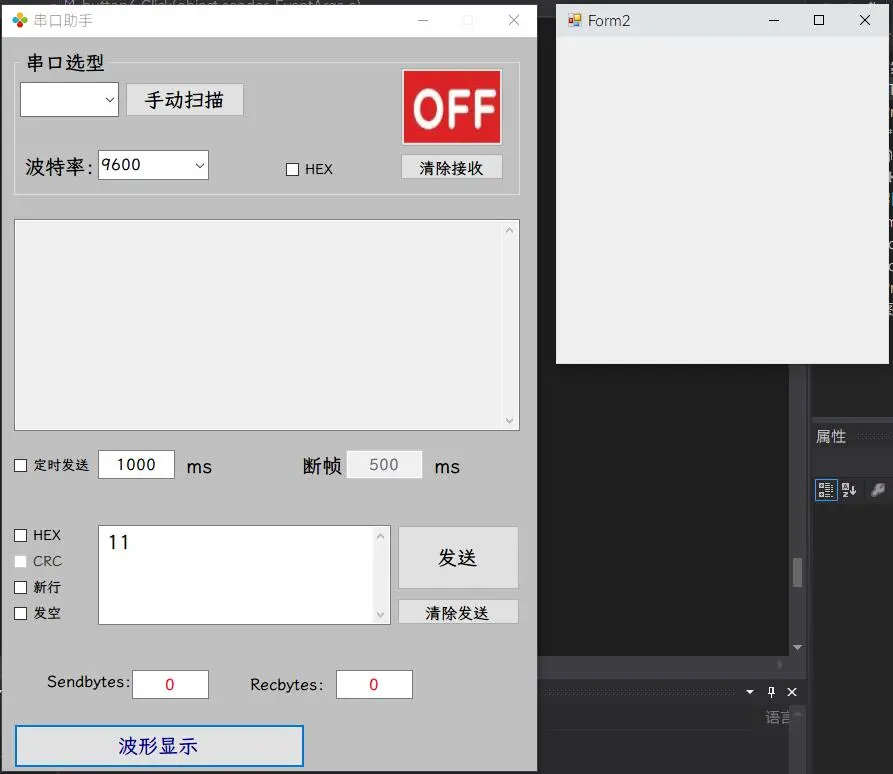
}
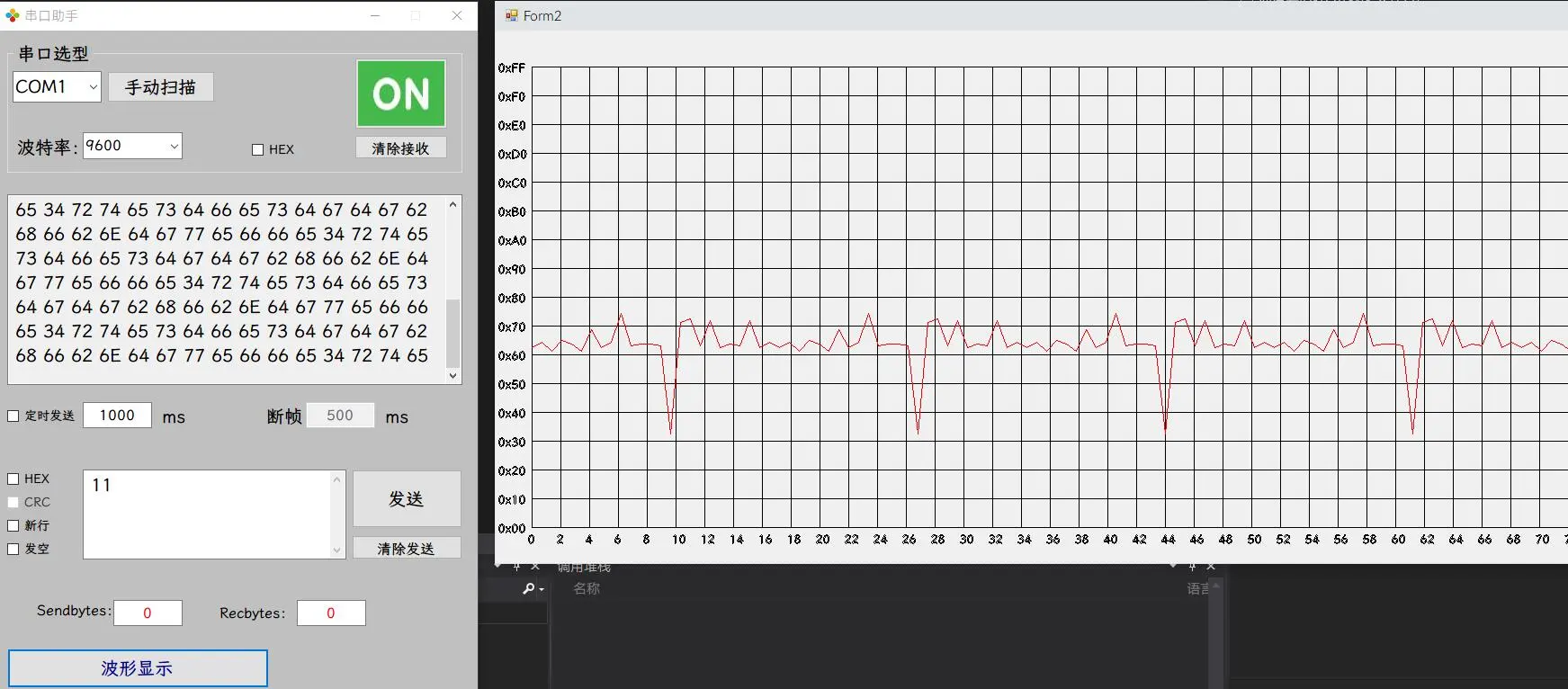
- 绘制显示窗体与坐标,显示波形
基于上面代码
Form1.cs
// 串口接收
private void serialPort1_DataReceived(object sender, SerialDataReceivedEventArgs e)
{
    try
    {
        byte[] data = new byte[serialPort1.BytesToRead];
        serialPort1.Read(data, 0, data.Length);

        // 遍历
        foreach (byte Number in data)
        {
            string str = Convert.ToString(Number, 16).ToUpper();
            textBox1.AppendText((str.Length == 1 ? "0" + str : str) + " ");
        }
        // 更新波形显示窗体的链表数据
        if (Form2 != null)
        {
            Form2.AddDataToList(data);
        }
    }
    catch
    {
        textBox1.AppendText("[" + DateTime.Now.ToString("HH:mm:ss") + "]" + "->");
        textBox1.AppendText("HEX格式接收错误!\r\n");
    }
}
Form2.cs
using System;
using System.Collections.Generic;
using System.ComponentModel;
using System.Data;
using System.Drawing;
using System.Linq;
using System.Text;
using System.Windows.Forms;

namespace TEST1
{
    public partial class Form2 : Form
    {
        private const int StartPrint = 40;  // 点坐标偏移量
        private const int Unit_length = 32; // 单位格大小

        private int DrawStep = 8;   // 默认绘制单位
        private const int MaxStep = 32; // 绘制单位最大值
        private const int MinStep = 1;  // 绘制单位最小值

        private List<byte> DataList = new List<byte>(); //线性链表

        private Pen TablePen = new Pen(Color.FromArgb(0x00, 0x00, 0x00));   //轴线颜色
        private Pen LinesPen = new Pen(Color.FromArgb(0xFF, 0x00, 0x00));   //波形颜色

        public Form2()
        {
            // 波形稳定刷新---开启双缓冲
            this.SetStyle(ControlStyles.DoubleBuffer | ControlStyles.UserPaint | ControlStyles.AllPaintingInWmPaint, true);
            this.UpdateStyles();

            InitializeComponent();
        }

        private void Form2_Load(object sender, EventArgs e)
        {
            // 重新设定波形显示窗体尺寸
            int width = Screen.GetWorkingArea(this).Width - My_EXE.MainForm.Width;
            int Heigth = this.Height - this.ClientRectangle.Height;
            Heigth += Unit_length * 16;
            Heigth += StartPrint * 2;
            this.Size = new Size(width, Heigth);
        }

        // 链表尾部添加数据
        public void AddDataToList(byte[] Data)
        {
            for (int i = 0; i < Data.Length; i++)
            {
                DataList.Add(Data[i]);
            }
            // 刷新显示
            this.Invalidate();
        }

        private void Form2_Paint(object sender, PaintEventArgs e)
        {
            String Str = "";
            System.Drawing.Drawing2D.GraphicsPath gp = new System.Drawing.Drawing2D.GraphicsPath();

            // 绘画横轴线
            for (int i = 0; i < (this.ClientRectangle.Height - StartPrint) / Unit_length; i++)
            {
                // 画直线---画笔,起始坐标,终点坐标
                e.Graphics.DrawLine(TablePen, StartPrint, StartPrint + i * Unit_length, this.ClientRectangle.Width, StartPrint + i * Unit_length);
                // "X"表示转换为16进制
                Str = ((16 - i) * 16).ToString("X");
                Str = "0x" + (Str.Length == 1 ? Str + "0" : Str);
                if (0 == i)
                {
                    Str = "0xFF";
                }
                gp.AddString(Str, this.Font.FontFamily, (int)FontStyle.Regular, 13, new RectangleF(0, StartPrint + i * Unit_length - 8, 400, 50), null);
            }
            // 绘画纵轴线
            for (int i = 0; i <= (this.ClientRectangle.Width - StartPrint) / Unit_length; i++)
            {
                e.Graphics.DrawLine(TablePen, StartPrint + i * Unit_length, StartPrint, StartPrint + i * Unit_length, StartPrint + Unit_length * 16);
                gp.AddString((i * (Unit_length / DrawStep)).ToString(), this.Font.FontFamily, (int)FontStyle.Regular, 13, new RectangleF(StartPrint + i * Unit_length - 7, this.ClientRectangle.Height - StartPrint + 4, 400, 50), null);
            }
            // 绘制文字
            e.Graphics.DrawPath(Pens.Black, gp);
            // 如果数据量大于可容纳的数据量,即删除最左数据
            if (DataList.Count >= (this.ClientRectangle.Width - StartPrint) / DrawStep)
            {
                DataList.RemoveRange(0, DataList.Count - (this.ClientRectangle.Width - StartPrint) / DrawStep);
            }
            for (int i = 0; i < DataList.Count - 1; i++)
            {
                e.Graphics.DrawLine(LinesPen, StartPrint + i * DrawStep, StartPrint + Unit_length * 16 - DataList[i] * (Unit_length / 16), StartPrint + (i + 1) * DrawStep, StartPrint + Unit_length * 16 - DataList[i + 1] * (Unit_length / 16));
            }
        }

        private void Form2_KeyDown(object sender, KeyEventArgs e)
        {
            switch (e.KeyCode)
            {
                    // 退出波形
                case Keys.Escape:
                    {
                        this.Close();
                        break;
                    }
                case Keys.PageUp:
                    {
                        // 放大波形
                        if (DrawStep < MaxStep)
                        {
                            DrawStep++;
                            this.Invalidate();
                        }
                        break;
                    }
                case Keys.PageDown:
                    {
                        // 缩小波形
                        if (DrawStep > MinStep)
                        {
                            DrawStep--;
                            this.Invalidate();
                        }
                        break;
                    }
                default: break;
            }
        }
    }
}
其他指令
// 启动多线程延时50ms
System.Threading.Thread.Sleep(50);
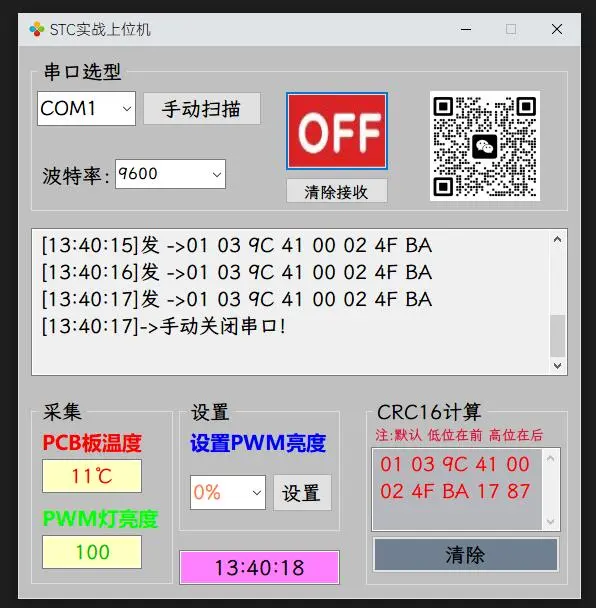
项目1- STC实战上位机
使用模板,把模板工程下的 文件夹,
suo,slncsproj后缀的名称改为你自定义名称,然后双击 sln文件进入,会报错正常,然后右键移除当前项目,右键选择【添加】,添加【现有项目】,找到工程文件夹下的csproj后缀文件打开即可进入工程后需要双击
Properties,把里面的程序集名称,默认命名空间也改名,然后运行报错,按照报错的行号进行替换即可然后把工程文件夹
bin,obj两个文件夹删除即可会重新生成的,然后关闭工程重新打开即可
Form1.cs
using System;
using System.Collections.Generic;
using System.ComponentModel;
using System.Data;
using System.Drawing;
using System.Linq;
using System.Text;
using System.Windows.Forms;
// 添加指令集
using System.IO.Ports;
using System.Runtime.InteropServices;
namespace STC实战上位机
{
public partial class My_EXE : Form
{
byte Send_Num = 0; //发送编号
[DllImport("kernel32")]
private static extern long WritePrivateProfileString(string section, string key, string val, string filePath); // 系统DLL导入ini写函数
[DllImport("kernel32")]
private static extern int GetPrivateProfileString(string section, string key, string def, StringBuilder retVal,int size, string filePath); // 系统DLL导入ini读函数
string FileName = System.AppDomain.CurrentDomain.BaseDirectory + "Backup.ini"; // ini文件名
StringBuilder BackupBuf = new StringBuilder(50); // 存储读出的ini内容变量
public My_EXE()
{
InitializeComponent();
// 禁止这种异常的抛出(不加的话运行会报错),避免出现跨线程访问控件
System.Windows.Forms.Control.CheckForIllegalCrossThreadCalls = false;
// 支持中文
serialPort1.Encoding = Encoding.GetEncoding("GB2312");
}
private void flowLayoutPanel1_Paint(object sender, PaintEventArgs e)
{
}
//打开软件加载
private void My_EXE_Load(object sender, EventArgs e)
{
SearchAndAddSerialToComboBox(serialPort1, comboBox1);
// 恢复发送栏
GetPrivateProfileString("串口1", "发送栏", "", BackupBuf, 50, FileName);
// 显示时间
textBox4.Text = DateTime.Now.ToString("HH:mm:ss");
}
// 手动扫描并添加可用串口
private void SearchAndAddSerialToComboBox(SerialPort MyPort, ComboBox MyBox)
{
MyBox.Text = " ";
// 获取本机串口列表
string[] ComputerPortName = SerialPort.GetPortNames();
string BackupPort;
// 恢复端口号
GetPrivateProfileString("串口1", "端口号", "", BackupBuf, 50, FileName);
BackupPort = BackupBuf.ToString();
//清空下拉框
MyBox.Items.Clear();
for (byte i = 0; i < ComputerPortName.Length; i++)
{
try
{
MyPort.PortName = ComputerPortName[i];
MyPort.Open();
MyBox.Items.Add(MyPort.PortName);
MyPort.Close();
// 检查端口号是否有效,端口号初始化为备份端口号
if (BackupPort == MyPort.PortName)
{
comboBox1.Text = BackupPort;
}
// 备份端口无效则默认第一个
if (MyBox.Text == "")
{
MyBox.Text = MyPort.PortName;
}
}
catch
{
}
}
if (MyBox.Text == "")
{
textBox1.AppendText("[" + DateTime.Now.ToString("HH:mm:ss") + "]" + "->");
textBox1.AppendText("没有检测到串口工具!\r\n");
}
// 备份端口号
WritePrivateProfileString("串口1", "端口号", MyBox.Text, FileName);
}
//【手动扫描】
private void button1_Click(object sender, EventArgs e)
{
// 先判断串口是否打开,打开了则要关闭再扫描
if (serialPort1.IsOpen == true)
{
serialPort1.Close();
button2.BackgroundImage = Properties.Resources.b1;
button2.Tag = "OFF";
textBox1.AppendText("[" + DateTime.Now.ToString("HH:mm:ss") + "]" + "->");
textBox1.AppendText("扫描并添加串口时关闭串口!\r\n");
}
SearchAndAddSerialToComboBox(serialPort1, comboBox1);
}
private void button2_Click(object sender, EventArgs e)
{
if (button2.Tag.ToString() == "OFF")
{
// 打开串口
try
{
serialPort1.PortName = comboBox1.Text;
// 把字符串波特率转换为32位波特率
serialPort1.BaudRate = Convert.ToInt32(comboBox2.Text);
serialPort1.Open();
button2.BackgroundImage = Properties.Resources.b2;
button2.Tag = "ON";
textBox1.AppendText("[" + DateTime.Now.ToString("HH:mm:ss") + "]" + "->");
textBox1.AppendText("手动打开串口!\r\n");
// 开启定时器
timer1.Start();
}
catch
{
serialPort1.Close();
button2.BackgroundImage = Properties.Resources.b1;
button2.Tag = "OFF";
textBox1.AppendText("[" + DateTime.Now.ToString("HH:mm:ss") + "]" + "->");
textBox1.AppendText("串口打开失败!\r\n");
timer1.Stop();
}
}
else
{
// 关闭串口
serialPort1.Close();
button2.BackgroundImage = Properties.Resources.b1;
button2.Tag = "OFF";
textBox1.AppendText("[" + DateTime.Now.ToString("HH:mm:ss") + "]" + "->");
textBox1.AppendText("手动关闭串口!\r\n");
timer1.Stop();
}
}
//【下拉框发生变化】
private void comboBox1_SelectedIndexChanged(object sender, EventArgs e)
{
if (serialPort1.IsOpen == true)
{
serialPort1.Close();
try
{
serialPort1.PortName = comboBox1.Text;
serialPort1.Open();
button2.BackgroundImage = Properties.Resources.b2;
button2.Tag = "ON";
textBox1.AppendText("[" + DateTime.Now.ToString("HH:mm:ss") + "]" + "->");
textBox1.AppendText("串口更换成功!\r\n");
}
catch
{
serialPort1.Close();
button2.BackgroundImage = Properties.Resources.b1;
button2.Tag = "OFF";
textBox1.AppendText("[" + DateTime.Now.ToString("HH:mm:ss") + "]" + "->");
textBox1.AppendText("串口更换失败!\r\n");
}
}
// 备份端口号
WritePrivateProfileString("串口1", "端口号", comboBox1.Text, FileName);
}
//【定时器扫描】
private void timer1_Tick(object sender, EventArgs e)
{
if (!serialPort1.IsOpen)
{
serialPort1.Close();
button2.BackgroundImage = Properties.Resources.b1;
button2.Tag = "OFF";
// 重新扫描并添加串口
SearchAndAddSerialToComboBox(serialPort1, comboBox1);
}
}
// 串口接收
private void serialPort1_DataReceived(object sender, SerialDataReceivedEventArgs e)
{
byte[] Data = new byte[serialPort1.BytesToRead]; // 定义缓冲区
// 检验数据是否接收完
bool Rec_Flag = true;
if (Send_Num == 1) // 采集命令
{
if (Data.Length < 9)
{
Rec_Flag = false;
}
}
else if (Send_Num == 2) // 控制命令
{
if (Data.Length < 8)
{
Rec_Flag = false;
}
}
else
{
serialPort1.DiscardOutBuffer(); //清空缓存
Rec_Flag = false;
}
// 数据处理
if (Rec_Flag)
{
// 提取数据
try
{
serialPort1.Read(Data, 0, Data.Length);
textBox1.AppendText("[" + DateTime.Now.ToString("HH:mm:ss") + "]" + "收 <-");
foreach (byte Number in Data)
{
string str = Convert.ToString(Number, 16).ToUpper();
textBox1.AppendText((str.Length == 1 ? "0" + str : str) + " ");
}
textBox1.AppendText("\r\n");
textBox1.AppendText("\r\n");
}
catch
{
}
// 数据解析
if (Data.Length == 9)
{
UInt16 CRC = Crc_Check(Data, 7);
byte CRC_H = (byte)( CRC >> 8);
byte CRC_L = (byte)CRC;
if (((Data[7] == CRC_L) && (Data[8] == CRC_H)) || ((Data[7] == CRC_H) && (Data[8] == CRC_L)))
{
// 校验地址与功能码
if ((Data[0] == 0x01) && (Data[1] == 0x03))
{
// 校验数据长度
if (Data[2] == 0x04)
{
// PCB板温度
float Temp_float = (float)(Data[4] / 2.0 - 30);
textBox2.Text = Temp_float.ToString() + "℃";
// PWM灯亮度值
switch (Data[6])
{
case 0:
{
textBox3.Text = "0";
break;
}
case 20:
{
textBox3.Text = "20";
break;
}
case 40:
{
textBox3.Text = "40";
break;
}
case 60:
{
textBox3.Text = "60";
break;
}
case 80:
{
textBox3.Text = "80";
break;
}
case 100:
{
textBox3.Text = "100";
break;
}
default: break;
}
}
}
}
else
{
textBox1.AppendText("\r\nCRC校验码错误,请检查\r\n");
}
}
else if (Data.Length == 8)
{
UInt16 CRC = Crc_Check(Data, 6);
byte CRC_H = (byte)( CRC >> 8);
byte CRC_L = (byte)CRC;
if (((Data[7] == CRC_L) && (Data[8] == CRC_H)) || ((Data[7] == CRC_H) && (Data[8] == CRC_L)))
{
// 校验地址与功能码
if ((Data[0] == 0x01) && (Data[1] == 0x06))
{
if ((Data[2] == 0x94) && (Data[3] == 0xC2))
{
// PWM灯亮度值
switch (Data[5])
{
case 0:
{
textBox3.Text = "0";
break;
}
case 20:
{
textBox3.Text = "20";
break;
}
case 40:
{
textBox3.Text = "40";
break;
}
case 60:
{
textBox3.Text = "60";
break;
}
case 80:
{
textBox3.Text = "80";
break;
}
case 100:
{
textBox3.Text = "100";
break;
}
default: break;
}
}
}
}
}
}
}
// 【清屏】
private void button3_Click(object sender, EventArgs e)
{
textBox1.Text = "";
}
// CRC计算
private UInt16 Crc_Check(byte[] Data, byte DataLEN)
{
UInt16 CRC = 0xFFFF;
for(byte i = 0; i < DataLEN; i++)
{
CRC ^= Data[i];
for(byte j = 0;j < 8; j++)
{
if((CRC & 0x0001) == 0x0001)
{
CRC = (UInt16)((CRC >> 1) ^ 0xA001);
}
else
{
CRC = (UInt16)(CRC >> 1);
}
}
}
CRC = (UInt16)((CRC >> 8) + (CRC << 8));
return CRC;
}
private void comboBox2_SelectedIndexChanged(object sender, EventArgs e)
{
serialPort1.BaudRate = Convert.ToInt32(comboBox2.Text);
}
private void label4_Click(object sender, EventArgs e)
{
}
// 采集数据
private void timer2_Tick(object sender, EventArgs e)
{
if (serialPort1.IsOpen)
{
try
{
byte[] Data = new byte[8] {0x01, 0x03, 0x9C, 0x41, 0x00, 0x02, 0x00, 0x00};
//插入CRC
UInt16 CRC = Crc_Check(Data, 6);
byte CRC_H = (byte)(CRC >> 8);
byte CRC_L = (byte)CRC;
Data[6] = CRC_L;
Data[7] = CRC_H;
// 发送
serialPort1.Write(Data, 0, 8);
textBox1.AppendText("[" + DateTime.Now.ToString("HH:mm:ss") + "]" + "发 ->");
foreach (byte Number in Data)
{
string str = Convert.ToString(Number, 16).ToUpper();
textBox1.AppendText((str.Length == 1 ? "0" + str : str) + " ");
}
textBox1.AppendText("\r\n");
Send_Num = 1;
}
catch
{
serialPort1.Close();
button2.BackgroundImage = Properties.Resources.b1;
button2.Tag = "OFF";
textBox1.AppendText("[" + DateTime.Now.ToString("HH:mm:ss") + "]" + "->");
textBox1.AppendText("采集命令发送失败\r\n");
timer1.Stop(); //关闭串口工具异常检测
}
}
}
private void button4_Click(object sender, EventArgs e)
{
if (serialPort1.IsOpen)
{
try
{
byte[] Data = new byte[8] { 0x01, 0x06, 0x9C, 0x42, 0x00, 0x00, 0x00, 0x00 };
// 获取PWM灯亮度值
switch (comboBox3.Text.Length)
{
case 2:
{
// 0%则把%去掉
Data[5] = Convert.ToByte(comboBox3.Text.Substring(0, 1), 10);
break;
}
case 3:
{
// 10%则把%去掉
Data[5] = Convert.ToByte(comboBox3.Text.Substring(0, 2), 10);
break;
}
case 4:
{
// 100%则把%去掉
Data[5] = Convert.ToByte(comboBox3.Text.Substring(0, 3), 10);
break;
}
default: break;
}
//插入CRC
UInt16 CRC = Crc_Check(Data, 6);
byte CRC_H = (byte)(CRC >> 8);
byte CRC_L = (byte)CRC;
Data[6] = CRC_L;
Data[7] = CRC_H;
// 发送
serialPort1.Write(Data, 0, 8);
textBox1.AppendText("[" + DateTime.Now.ToString("HH:mm:ss") + "]" + "发 ->");
foreach (byte Number in Data)
{
string str = Convert.ToString(Number, 16).ToUpper();
textBox1.AppendText((str.Length == 1 ? "0" + str : str) + " ");
}
textBox1.AppendText("\r\n");
// 重新启动timer2,错开采集与控制指令
timer2.Stop();
timer2.Start();
Send_Num = 2;
}
catch
{
serialPort1.Close();
button2.BackgroundImage = Properties.Resources.b1;
button2.Tag = "OFF";
textBox1.AppendText("[" + DateTime.Now.ToString("HH:mm:ss") + "]" + "->");
textBox1.AppendText("控制命令发送失败\r\n");
timer1.Stop(); //关闭串口工具异常检测
}
}
}
private void comboBox3_SelectedIndexChanged(object sender, EventArgs e)
{
}
private void textBox5_TextChanged(object sender, EventArgs e)
{
}
private void button5_Click(object sender, EventArgs e)
{
if (textBox5.Text == "")
{
MessageBox.Show("不能为空", "提示");
return;
}
if (button5.Tag.ToString() == "1")
{
int i = 0;
// 处理字符串
string Buf = textBox5.Text;
// 去掉0x 0X
Buf = Buf.Replace("0x", string.Empty);
Buf = Buf.Replace("0X", string.Empty);
Buf = Buf.Replace(" ", string.Empty);
byte[] data = new byte[((Buf.Length - Buf.Length % 2) / 2) + 2];
//循环发送,保证都是2位,1位就丢弃
for (i = 0; i < (Buf.Length - Buf.Length % 2) / 2; i++)
{
try
{
// 转换为16进制
data[i] = Convert.ToByte(Buf.Substring(i * 2, 2), 16);
}
catch
{
MessageBox.Show("非十六进制!!", "警告");
textBox5.Text = "";
return;
}
}
UInt16 CRC = Crc_Check(data, (byte)i);
byte CRC_H = (byte)(CRC >> 8);
byte CRC_L = (byte)CRC;
// 默认低位在前高位在后
data[i] = CRC_L;
data[i + 1] = CRC_H;
textBox5.Text = "";
textBox5.ForeColor = Color.Red;
foreach (byte Number in data)
{
string str = Convert.ToString(Number, 16).ToUpper();
textBox5.AppendText((str.Length == 1 ? "0" + str : str) + " ");
}
button5.Tag = "2";
button5.Text = "清除";
}
else
{
textBox5.Text = "";
button5.Text = "计算";
textBox5.ForeColor = Color.Black;
button5.Tag = "1";
}
}
private void timer3_Tick(object sender, EventArgs e)
{
textBox4.Text = DateTime.Now.ToString("HH:mm:ss");
}
}
}
项目2-MSP上位机
Form1.cs
using System;
using System.Collections.Generic;
using System.ComponentModel;
using System.Data;
using System.Drawing;
using System.Linq;
using System.Text;
using System.Windows.Forms;
using System.IO.Ports;
using System.Runtime.InteropServices;
namespace MSP430太阳能实战
{
public partial class Form1 : Form
{
byte Send_Num = 0; //发送编号,方便串口接收数据
[DllImport("kernel32")]
private static extern long WritePrivateProfileString(string section, string key, string val, string filePath);//系统dll导入ini写函数
[DllImport("kernel32")]
private static extern int GetPrivateProfileString(string section, string key, string def, StringBuilder retVal, int size, string filePath);//系统dll导入ini读函数
string FileName = System.AppDomain.CurrentDomain.BaseDirectory + "Backup.ini";//ini文件名
StringBuilder BackupBuf = new StringBuilder(10);//存储读出ini内容变量
public Form1()
{
InitializeComponent();
serialPort1.Encoding = Encoding.GetEncoding("GB2312"); //支持汉字
System.Windows.Forms.Control.CheckForIllegalCrossThreadCalls = false;
}
private void Form1_Load(object sender, EventArgs e)
{
comboBox2.Text = "0%";
SearchAndAddSerialToComboBox(serialPort1, comboBox1);//扫描端口号,并将可用端口添加至下拉列表
this.button2.PerformClick(); //自动打开串口
}
private void Form1_FormClosing(object sender, FormClosingEventArgs e)
{
}
private void SearchAndAddSerialToComboBox(SerialPort MyPort, ComboBox MyBox)
{
string[] ComputerPortName = SerialPort.GetPortNames(); //获取本机串口列表
bool MyBackupPortFlag = false; //备份端口号可用标志位
GetPrivateProfileString("串口1", "端口号", "", BackupBuf, 10, FileName); //获取备份的端口号
string MyBackupPortName = BackupBuf.ToString();
//添加端口号
MyBox.Items.Clear(); //清空ComboBox内容
for (int i = 0; i < ComputerPortName.Length; i++) //循环
{
if (MyBackupPortName == ComputerPortName[i]) //之前的端口号可用,置位标志位
{
MyBackupPortFlag = true;
}
try //核心原理是依靠try和catch完成遍历
{
MyPort.PortName = ComputerPortName[i];
MyPort.Open(); //如果失败,后面的代码不会执行
MyBox.Items.Add(MyPort.PortName); //打开成功,添加至下拉列表
MyPort.Close(); //关闭
}
catch
{
}
}
//端口号赋初值
if (MyBackupPortFlag == true)
{
MyBox.Text = MyBackupPortName; //添加备份的端口号
}
else
{
if (ComputerPortName.Length > 0)
{
MyBox.Text = ComputerPortName[ComputerPortName.Length - 1]; //添加数值大的端口号
}
else
{
textBox1.AppendText("[" + DateTime.Now.ToString("HH:mm:ss") + "]" + "->");
textBox1.AppendText("没有检测到串口工具!\r\n");
}
}
}
private void button1_Click(object sender, EventArgs e)
{
if (!serialPort1.IsOpen)
{
SearchAndAddSerialToComboBox(serialPort1, comboBox1);//扫描端口号,并将可用端口添加至下拉列表
}
}
//串口工具异常检测,5S检测一次
private void timer1_Tick_1(object sender, EventArgs e)
{
try
{
if (!serialPort1.IsOpen)
{
serialPort1.Close();
button2.BackgroundImage = Properties.Resources.Image_CloseSerial;
button2.Tag = "OFF";
}
}
catch { }
}
private void button2_Click(object sender, EventArgs e)
{
if (button2.Tag.ToString() == "ON")
{
//关闭串口
try
{
serialPort1.Close();
button2.BackgroundImage = Properties.Resources.Image_CloseSerial;
button2.Tag = "OFF";
textBox1.AppendText("[" + DateTime.Now.ToString("HH:mm:ss") + "]" + "->");
textBox1.AppendText("手动关闭串口!\r\n");
}
catch
{
}
}
else //串口已关闭
{
//打开串口
try
{
serialPort1.PortName = comboBox1.Text; //端口号
serialPort1.Open(); //打开端口
button2.BackgroundImage = Properties.Resources.Image_OpenSerial;
button2.Tag = "ON";
textBox1.AppendText("[" + DateTime.Now.ToString("HH:mm:ss") + "]" + "->");
textBox1.AppendText("串口打开成功!\r\n");
WritePrivateProfileString("串口1", "端口号", comboBox1.Text, FileName);
}
catch
{
serialPort1.Close();
button2.BackgroundImage = Properties.Resources.Image_CloseSerial;
button2.Tag = "OFF";
textBox1.AppendText("[" + DateTime.Now.ToString("HH:mm:ss") + "]" + "->");
textBox1.AppendText("串口打开失败!\r\n");
}
}
}
private void comboBox1_SelectedIndexChanged(object sender, EventArgs e)
{
if (serialPort1.IsOpen) //串口已打开,此时关闭串口
{
serialPort1.Close(); //打开端口
try
{
serialPort1.PortName = comboBox1.Text; //端口号
serialPort1.Open(); //打开端口
textBox1.AppendText("[" + DateTime.Now.ToString("HH:mm:ss") + "]" + "->");
textBox1.AppendText("串口更换成功!\r\n");
WritePrivateProfileString("串口1", "端口号", comboBox1.Text, FileName);
}
catch
{
serialPort1.Close();
button2.BackgroundImage = Properties.Resources.Image_CloseSerial;
button2.Tag = "OFF";
textBox1.AppendText("[" + DateTime.Now.ToString("HH:mm:ss") + "]" + "->");
textBox1.AppendText("串口更换失败!\r\n");
}
}
}
//CRC校验
private UInt16 Crc_Check(byte[] Data, byte DataLEN)
{
UInt16 CRC = 0xFFFF;
for (byte i = 0; i < DataLEN; i++)
{
CRC ^= Data[i];
for (byte j = 0; j < 8; j++)
{
if ((CRC & 0x0001) == 0x0001)
{
CRC = (UInt16)((CRC >> 1) ^ 0xA001);
}
else
{
CRC = (UInt16)(CRC >> 1);
}
}
}
CRC = (UInt16)((CRC >> 8) + (CRC << 8));
return CRC;
}
private void serialPort1_DataReceived(object sender, SerialDataReceivedEventArgs e)
{
byte[] Data = new byte[serialPort1.BytesToRead]; //定义缓冲区,因为串口接收事件触发时字节数不固定
bool Rec_Flag = true;
if (Send_Num == 1) //请求数据指令,返回13字节
{
if (Data.Length < 13)
Rec_Flag = false;
}
else if (Send_Num == 2) //设置亮度指令,返回8字节
{
if (Data.Length < 8)
Rec_Flag = false;
}
else
{
serialPort1.DiscardOutBuffer(); //清空缓存
Rec_Flag = false;
}
//数据处理
if (Rec_Flag == true)
{
//提取数据
try
{
serialPort1.Read(Data, 0, Data.Length);
textBox1.AppendText("[" + DateTime.Now.ToString("HH:mm:ss") + "]" + "收 <- ");
foreach (byte Member in Data) //遍历用法
{
string str = Convert.ToString(Member, 16).ToUpper();
textBox1.AppendText((str.Length == 1 ? "0" + str : str) + " ");
}
textBox1.AppendText("\r\n");
textBox1.AppendText("\r\n");
}
catch { }
//数据解析 -> 请求数据指令,返回13字节
if ((Send_Num == 1) && (Data.Length == 13))
{
//CRC
UInt16 CRC = Crc_Check(Data, 11);
byte CRC_H = (byte)(CRC >> 8);
byte CRC_L = (byte)CRC;
//校验CRC
if (((Data[11] == CRC_L) && (Data[12] == CRC_H)) || ((Data[11] == CRC_H) && (Data[12] == CRC_H)))
{
//校验地址与功能码
if ((Data[0] == 0x01) && (Data[1] == 0x03))
{
//校验数据长度
if (Data[2] == 0x08)
{
//VIN电压
float Temp_VIN = ((float)(Data[3] * 256 + Data[4])) / 10;
textBox2.Text = Temp_VIN.ToString() + "V";
//BAT电压
float Temp_BAT = (float)Data[6] / 10;
textBox3.Text = Temp_BAT.ToString() + "V";
//路灯状态
UInt16 PWM_Duty = (UInt16)(Data[7] * 256 + Data[8]);
switch (PWM_Duty)
{
case 0: textBox4.Text = "100%"; break;
case 1000: textBox4.Text = "80%"; break;
case 2000: textBox4.Text = "60%"; break;
case 3000: textBox4.Text = "40%"; break;
case 4000: textBox4.Text = "20%"; break;
case 5001: textBox4.Text = "0%"; break;
default: break;
}
//充电状态
switch (Data[10])
{
case 1: textBox5.Text = "正在充电"; textBox5.ForeColor = Color.Red; break;
case 2: textBox5.Text = "完成充电"; textBox5.ForeColor = Color.Green; break;
case 3: textBox5.Text = "停止充电"; textBox5.ForeColor = Color.Red; break;
default: break;
}
}
}
}
}
//数据解析 -> 设置路灯亮度,返回8字节
if ((Send_Num == 2) && (Data.Length == 8))
{
//数据原路返回,不需要解析
}
}
}
//间隔1s请求stm32主板数据
private void timer2_RequestData_Tick(object sender, EventArgs e)
{
if (serialPort1.IsOpen)
{
try
{
byte[] Data = new byte[8] { 0x01, 0x03, 0x9C, 0x41, 0x00, 0x04, 0x00, 0x00 };
//插入CRC
UInt16 CRC = Crc_Check(Data, 6);
byte CRC_H = (byte)(CRC >> 8);
byte CRC_L = (byte)CRC;
Data[6] = CRC_L;
Data[7] = CRC_H;
serialPort1.Write(Data, 0, 8); //发送
textBox1.AppendText("[" + DateTime.Now.ToString("HH:mm:ss") + "]" + "发 -> ");
foreach (byte Menber in Data)
{
string str = Convert.ToString(Menber, 16).ToUpper();
textBox1.AppendText((str.Length == 1 ? "0" + str : str) + " ");
}
Send_Num = 1;
}
catch
{
serialPort1.Close();
button2.BackgroundImage = Properties.Resources.Image_CloseSerial;
button2.Tag = "OFF";
textBox1.AppendText("[" + DateTime.Now.ToString("HH:mm:ss") + "]" + "->");
textBox1.AppendText("请求数据命令发送失败");
}
}
}
//设置路灯亮度
private void button3_Click(object sender, EventArgs e)
{
if (serialPort1.IsOpen)
{
try
{
//延时50ms,确保指令间有间隔
System.Threading.Thread.Sleep(50);
byte[] Data = new byte[8] { 0x01, 0x06, 0x9C, 0x43, 0x00, 0x00, 0x00, 0x00 };
switch (comboBox2.Text)
{
case "0%" : Data[4] = 0x13; Data[5] = 0x89; break;
case "20%" : Data[4] = 0x0F; Data[5] = 0xA0; break;
case "40%" : Data[4] = 0x0B; Data[5] = 0xB8; break;
case "60%" : Data[4] = 0x07; Data[5] = 0xD0; break;
case "80%" : Data[4] = 0x03; Data[5] = 0xE8; break;
case "100%": Data[4] = 0x00; Data[5] = 0x00; break;
default:break;
}
//插入CRC
UInt16 CRC = Crc_Check(Data, 6);
byte CRC_H = (byte)(CRC >> 8);
byte CRC_L = (byte)CRC;
Data[6] = CRC_L;
Data[7] = CRC_H;
serialPort1.Write(Data, 0, 8); //发送
textBox1.AppendText("[" + DateTime.Now.ToString("HH:mm:ss") + "]" + "发 -> ");
foreach (byte Member in Data)
{
string str = Convert.ToString(Member, 16).ToUpper();
textBox1.AppendText((str.Length == 1 ? "0" + str : str) + " ");
}
//重新启动timer2,确保指令间有间隔
timer2_RequestData.Stop();
timer2_RequestData.Start();
Send_Num = 2;
}
catch
{
serialPort1.Close();
button2.BackgroundImage = Properties.Resources.Image_CloseSerial;
button2.Tag = "OFF";
textBox1.AppendText("[" + DateTime.Now.ToString("HH:mm:ss") + "]" + "->");
textBox1.AppendText("请求数据命令发送失败");
}
}
}
}
}